By Tim Wang - Development Manager, tPanel - LinkedIn -> - Updated 16 October 2026
Business process automation is using software to handle repeated, rule-based business steps so your people do not have to do them by hand - data entry, routing and handovers, reminders, approvals, and reporting. Instead of someone copying a lead from a form into a spreadsheet, chasing a manager for sign-off, then emailing an update, the software does each step the moment its trigger fires.
This guide explains how to choose a process to automate, compare existing tools with a custom build, and measure changes in time spent and errors after implementation.
What Is Business Process Automation?
Business process automation (BPA) is the practice of having software carry out the predictable, repeatable steps in a workflow without a person driving each one. A process is automatable when it follows rules you can describe: when this happens, do that, unless this exception applies. If you can write the steps down as a checklist, software can usually run that checklist for you.
It helps to separate two things. A task is a single action - send an email, update a record. A process is a chain of tasks that moves work from one state to the next, often across more than one person or system. Automation can target a single task, but the bigger wins come from automating a whole process end to end so work flows through without stalling on someone's to-do list. This is the foundation of most custom business software: connect the steps, encode the rules, and let the system move the work.
BPA is not artificial intelligence, though the two overlap. Classic automation follows fixed rules. When a step needs interpretation - reading a messy email, classifying a request, summarising a document - that is where AI workflow automation adds a layer of judgement on top of the rules.
Why Automation Pays Off for Small and Mid Businesses
Automation can reduce repeated data entry and manual handovers, leaving more time for customer service and work that needs judgement. Look for improvements in these areas:
- Less repetitive work. Identify the hours spent copying data, chasing approvals and sending routine updates that software could handle.
- Fewer data-entry errors. Consistent rules and validation can reduce mistakes caused by retyping. The source data and rules still need to be checked.
- More timely responses. Enquiries can be assigned and notifications sent when they arrive, reducing the wait for someone to check an inbox.
- Clear work status. Record the current stage, owner and waiting time so the team can identify delays.
- Less admin as volume grows. Handling routine steps automatically can reduce the extra work associated with growth. Measure the time saved rather than assuming a staffing reduction.
None of this requires replacing your team. It removes the dull, error-prone parts of their day so they spend time on work that needs a person.

What Should You Automate First?
Choose one process and check how often it runs, how clear its rules are, what errors occur and where work is delayed. Use those findings to define the first project.
- High-frequency It happens many times a day or week, so small time savings add up fast.
- Rule-based The steps are predictable and you can write them down as if-this-then-that.
- Error-prone Manual handling causes mistakes that cost money or trust.
- A bottleneck Work piles up here, or it depends on one person being available.
A process that is frequent, rule-based, error-prone, and a known bottleneck is the ideal first project. Here are the processes most Australian SMBs automate early:
Data entry & handover
Copying information between a form, a spreadsheet, your CRM, and your accounting tool. Re-keying is slow and a common source of errors.
Approvals & notifications
Routing a quote, leave request, or purchase for sign-off, then notifying the right people when it is approved or rejected.
Lead assignment & follow-up
Capturing an enquiry, assigning it to the right rep by rules, and triggering timely follow-ups so nothing goes cold.
Reporting
Pulling numbers from several systems into a weekly summary, instead of one person rebuilding the same report by hand.
Document & email processing
Reading incoming documents or emails, extracting the key fields, and filing or routing them to the right place.
Invoicing & onboarding
Generating invoices on a schedule or trigger, and running new-client or new-staff onboarding steps in the right order.
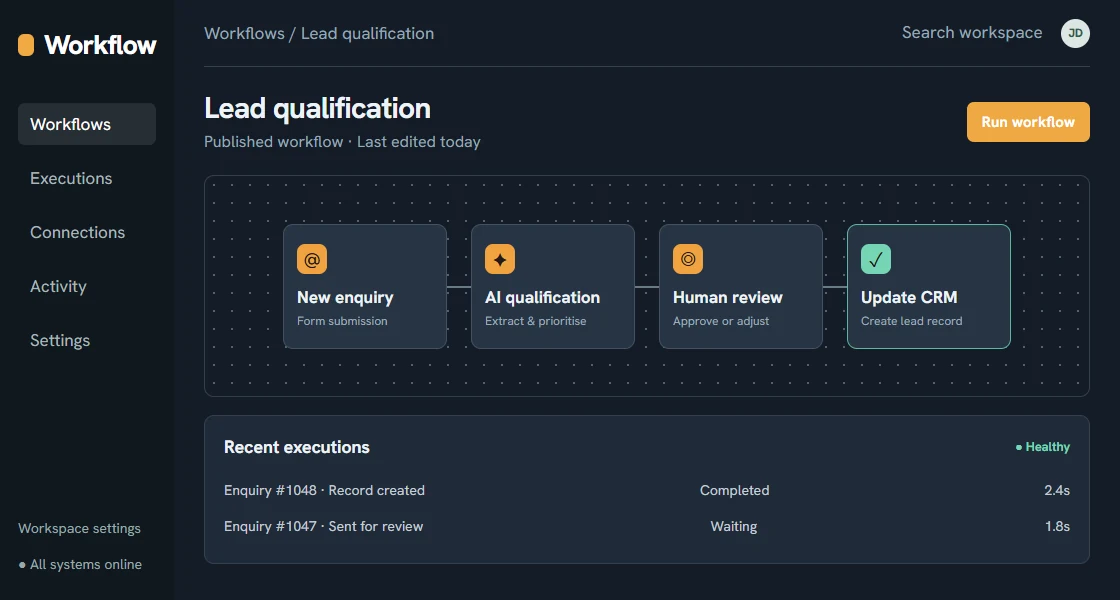
Illustrative interfaces - Fictional sample data
No-Code Tools vs Custom Automation: When Each Fits
You do not always need a developer to automate a process. No-code platforms like Zapier, Make, and n8n connect popular apps and run simple workflows with little or no code. They are the right starting point for many businesses. The question is where they stop being the best tool and a custom build starts paying off. The table below is a rough guide.
| Factor | No-code (Zapier / Make / n8n) | Custom automation |
|---|---|---|
| Complexity of logic | Simple, linear if-this-then-that | Branching rules, many exceptions |
| Volume | Low to moderate | High - where per-task pricing hurts |
| Apps involved | Popular tools with ready connectors | Legacy or niche systems, deep data |
| Data sensitivity | Standard, low-risk data | Sensitive data, tighter control needed |
| How core it is | Supporting, around-the-edges tasks | Core to how the business runs |
How no-code pricing works. Tools like Zapier and Make generally follow the same model: a free tier with a cap on how many tasks or operations you can run each month, then paid tiers that scale with volume and features. The catch for a growing business is that the price tracks usage - every run of every workflow counts against your quota, so a busy automation that fires hundreds of times a day can climb tiers quickly. As an illustrative guide only, entry paid plans tend to sit in the low tens of dollars per month and climb into the hundreds as volume and steps grow; the exact numbers change often, so check current pricing on each vendor's site before you commit. This is exactly the point where high-volume workflows can become cheaper to run as a custom build, because a one-off build does not charge you per task forever.
The honest answer for most SMBs is both. Use no-code tools for the quick wins at the edges, and invest in custom automation for the workflows that are central, high-volume, or too particular to fit a template. When the hard part is making several systems talk to each other reliably, that is a system integration services problem as much as an automation one, and it is worth getting the connections right before layering logic on top. For a custom automation build, expect a one-off investment - a single focused workflow typically lands in the A$10,000-40,000 range, while automation woven into a larger custom system more often sits in the A$40,000-150,000 range depending on how many systems it touches and how complex the rules are. Treat these as planning estimates, not quotes.
How to Automate a Process, Step by Step
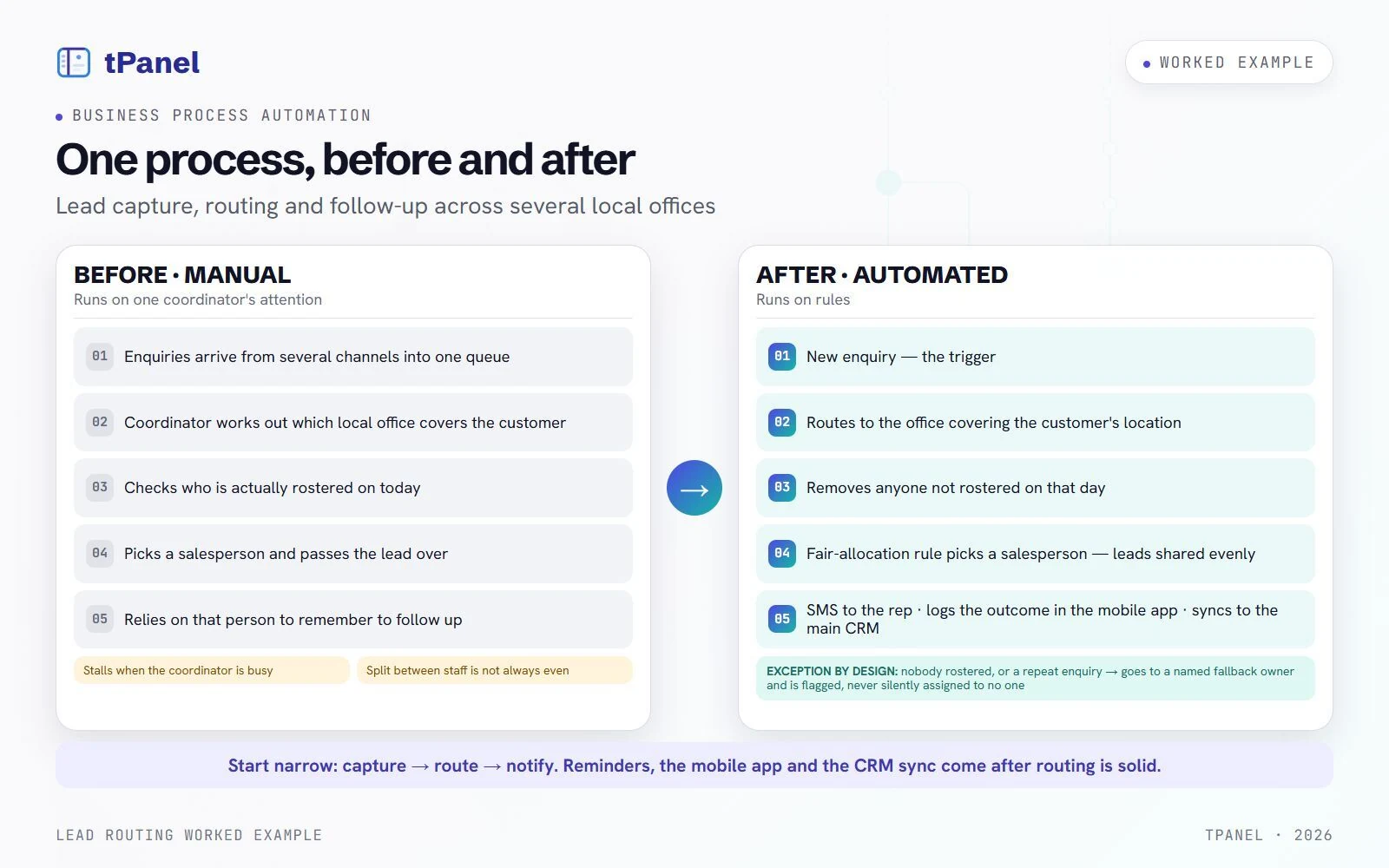
A reliable automation project follows the same shape whether you build it in a no-code tool or commission a custom system. Work through these five steps in order. To make them concrete, the panels below thread one real example through all five: a lead routing and tracking system tPanel built for a multi-office services business that receives customer enquiries from several channels.
- 1. Map the process as it really is. Write down every step as it happens today - who does it, what triggers it, what they have to look up, and where it stalls. Watch the work for a week rather than describing how it is supposed to run; the gap between the two is usually where the problems live. You cannot automate what you have not made explicit.
Example: today, enquiries arrive from several channels into one queue. Someone works out which local office covers the customer's area, checks who is actually rostered on, picks a salesperson and passes the lead over - then relies on that person to remember when to follow up. It stalls when the coordinator is busy, and the split between staff is not always even. - 2. Pick the first workflow - narrow. From the map, choose the single highest-value, rule-based stretch, not the whole thing. A narrow first win is easier to ship, easier to measure, and easier to unpick if it goes wrong.
Example: the first workflow is just capture -> route -> notify. The follow-up reminders, the mobile app and the sync to the main CRM come later, once routing is solid. - 3. Define the trigger, the rules, and the exceptions. Pin down exactly what starts the workflow, what should happen at each step, and - just as importantly - what happens when something does not fit the rule. Exceptions are where weak automations quietly break, so design them on purpose rather than discovering them in production.
Example: the trigger is a new enquiry. The rule routes it to the office covering the customer's location, removes anyone not rostered on that day, then picks a salesperson by a fair-allocation rule so leads are shared evenly. The exception: what if nobody in that area is working, or the customer has enquired before? The lead goes to a named fallback owner and is flagged, instead of being silently assigned to no one. - 4. Build, integrate, and test the unhappy paths. Configure the workflow and connect it to the systems it touches - your CRM, accounting tool, inbox, or database - so data flows without manual copying. Then deliberately feed it the broken inputs: the blank field, the duplicate, the state you do not cover.
Example: the assigned salesperson gets an SMS, and a companion mobile app lets them call the customer and log the outcome on the spot. Every update is saved in the custom CRM and synced to the client's main CRM, such as HubSpot or Salesforce. Before go-live, you test the broken paths: an area with nobody rostered, a duplicate enquiry, an after-hours lead. - 5. Measure against the baseline, then refine. Compare the result against the numbers you captured in step one - not against a feeling. Fix the edge cases that surface in the first few weeks, then expand to the next process.
Example: you check whether leads are assigned in seconds, shared fairly across the team, and whether the timed follow-up prompts fire - the first call when it is due, and a reminder to call back based on what was said last time. From there the same system grows into the full follow-up cadence and reporting.
Mapping first is the step people skip, and it is the one that matters most. If you are weighing whether a process has outgrown spreadsheets and manual workarounds altogether, our guide on the signs you need custom software is a useful companion to this one.
Why Do Automation Projects Fail?
Workflows can stop because an API changes, data is missing or an exception has no owner. Plan how these issues will be detected, who will receive the alert and how processing can resume.
- It breaks silently when something upstream changes. Automations depend on other systems - a form, an app's API, a CRM field. When one of those changes (a vendor updates their API, someone renames a field, a login expires), the workflow can stop or start doing the wrong thing without raising its hand. The fix is to expect upstream change and build in alerts, not to assume things will stay still.
- It runs on messy data and spreads the mess faster. Automation is an amplifier. Point it at clean, consistent data and it scales good work; point it at duplicated records, half-filled fields, and inconsistent formats and it scales the errors just as efficiently - only faster and across more systems. Tidy the data the process relies on before you automate it, or you are paying to make mistakes at speed.
- Nobody is watching, so a stoppage goes unnoticed. A manual process fails visibly - someone is standing there waiting. An automated one can stop in the background and look completely normal until a customer asks where their response went. Without monitoring and a simple alert when a run fails or volume drops to zero, the first sign of trouble is usually a complaint.
- The wrong thing was automated. Some steps should stay human. A judgement call, a sensitive customer conversation, an approval that genuinely needs a person's eye - automating these to save a few minutes can cost far more in goodwill or risk than the manual version ever did. The goal is to remove the repetitive parts of a job, not to push a person out of a decision that needs one.
- It is built once and never owned. A workflow set up by someone who has since left, with no documentation and no owner, becomes a black box nobody dares touch. When it breaks, no one knows how it worked. Every automation worth keeping needs an owner, a short note on what it does and what it touches, and a way to turn it off.
The thread running through all of these is the same: automation is not "set and forget". It is a small system that needs clean inputs, monitoring, and an owner. Treated that way, the failure modes above are manageable. Ignored, they are why an automation that looked like a win in month one is quietly causing problems by month six.
How to Measure ROI Honestly
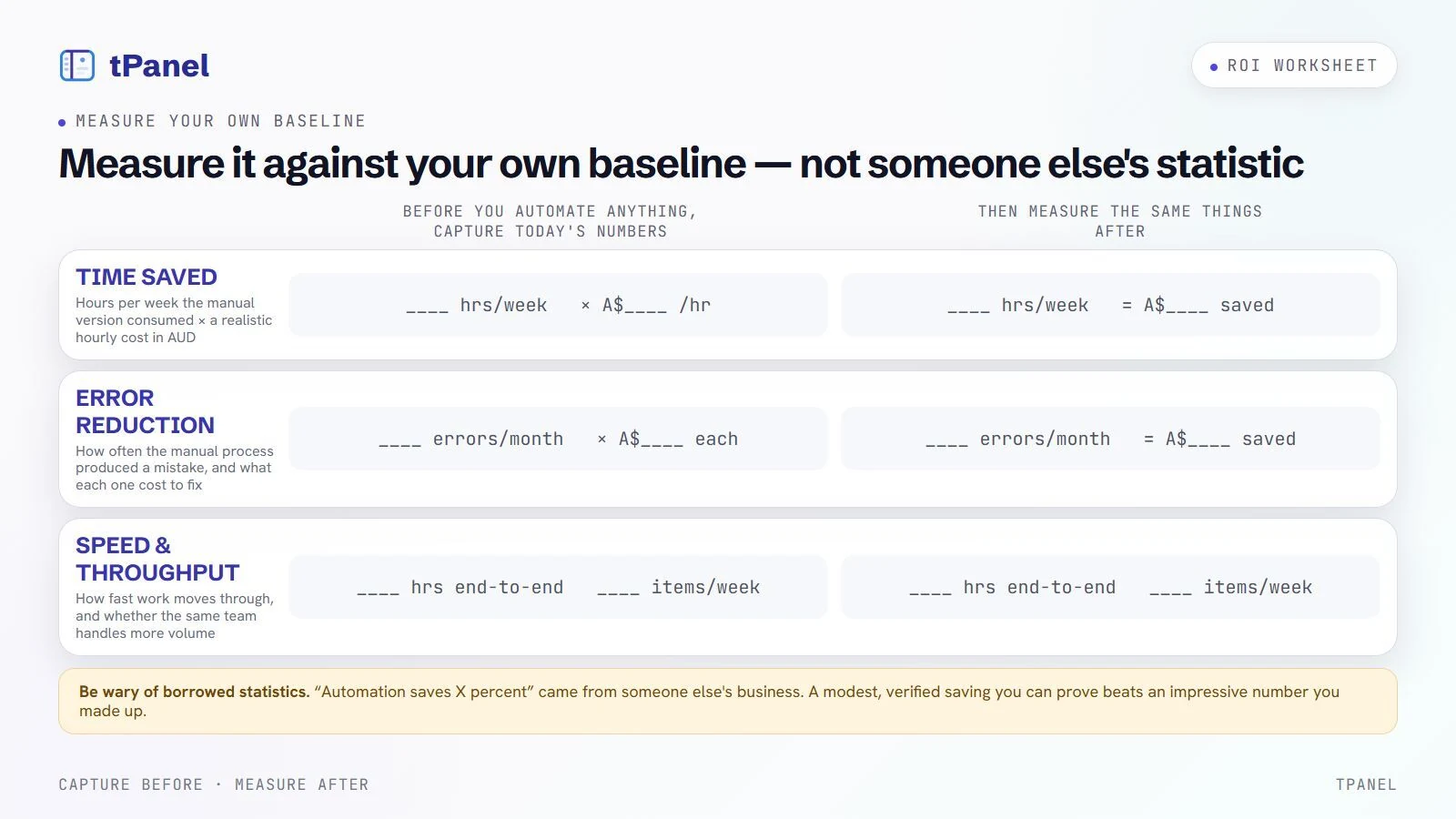
The return on automation is real, but only if you measure it against a baseline instead of guessing. Before you automate anything, capture how the process performs today - how long it takes, how often it goes wrong, how long work waits. Then measure the same things afterwards. Three measures cover most cases:
- Time saved. Estimate the hours per week the manual version consumed, then track what the automated version frees up. Multiply by a realistic hourly cost to put a dollar figure on it in AUD.
- Error reduction. Count how often the manual process produced a mistake - a wrong figure, a missed step, a duplicate - and what each one cost to fix or in lost goodwill. Compare after.
- Speed and throughput. Measure how fast work now moves through the process, and whether the same team is handling more volume without extra hours.
Be wary of borrowed statistics. Headline figures like "automation saves X percent" come from someone else's business, not yours. The only ROI you can stand behind is the one you measured against your own before-and-after. A modest, verified saving you can prove beats an impressive number you made up.
How tPanel Approaches Automation
tPanel is an Australian custom software development company, and we build business process automation the same way every time: with your actual process, not a product demo. We map how work moves today, find the steps that are frequent, rule-based, and stuck, and agree on a first workflow narrow enough to ship and prove quickly.
From there we design the rules and the exceptions, connect the systems involved, and measure against the baseline so the result is something you can defend - not a claim. Where steps need interpretation rather than fixed rules, we add AI workflow automation; where the real challenge is getting tools to talk to each other, we handle the system integration services underneath. Most of our automation work ends up as part of a larger custom business system, so the pieces fit together instead of becoming another set of disconnected tools.
If you have a process that is eating hours every week, the fastest way to find out what automation is worth is to walk through it with us. Use the form below to start.
Follow one order through a real integration
Our Everau/Tangwealth order hub case study documents how sales channels connect with inventory and warehouse operations. It illustrates a process spanning multiple systems, rather than a single isolated task. Any workload reduction reported there belongs to that project and its customer feedback; it is not a forecast for a new automation.
For your own pilot, track one order from creation through fulfilment. Define which system owns each status, how a retry avoids a duplicate and who handles an exception. Measure staff time on both normal orders and failed handovers before and after the change. A faster normal path is not enough if exceptions create more manual work.
Frequently asked questions about business process automation
Can't see your question here? Tell us what you're trying to build and we'll answer it directly - no sales script.
What is business process automation?
Business process automation is using software to handle repeated, rule-based business steps so people do not have to do them by hand. Typical targets are data entry, routing and handovers, reminders, approvals, and reporting. The goal is to remove manual work from predictable steps, keep them consistent, and free staff for work that needs judgement.
What should a small business automate first?
Start with a process that is high-frequency, rule-based, error-prone, and a known bottleneck. For most Australian small businesses that means lead assignment and follow-up, copying data between tools, approval and notification chains, or routine reporting. Pick one process with a clear before-and-after so you can measure the result, then expand from there.
Zapier or Make versus custom automation, which should I use?
Use Zapier, Make, or n8n when the workflow is simple, connects popular apps, and the volume is low to moderate. Move to custom automation when the logic is complex, the data is sensitive, the volume is high enough that per-task pricing hurts, or the process is core to how your business runs and needs to behave exactly your way. Many businesses use both: no-code tools for the edges, custom for the core.
How much does business process automation cost and what is the ROI?
No-code tools like Zapier or Make start from low monthly subscriptions in AUD, scaling with task volume and connected apps. A custom automation project is a larger one-off investment that varies with how many systems it touches and how complex the rules are. ROI comes from hours saved each week, fewer costly errors, and faster turnaround. Measure the baseline first so the return is real, not guessed.
Does business process automation replace staff?
Usually no. Automation removes the repetitive, rule-based parts of a job - the copying, chasing, and re-keying - so the same team handles more volume and spends time on work that needs judgement. Most Australian SMBs use automation to scale without adding headcount rather than to cut roles.
Find out what automating one process is worth
Tell us about a process that is eating hours each week. We will map it, find the first workflow to automate, and give you an honest read on the return.