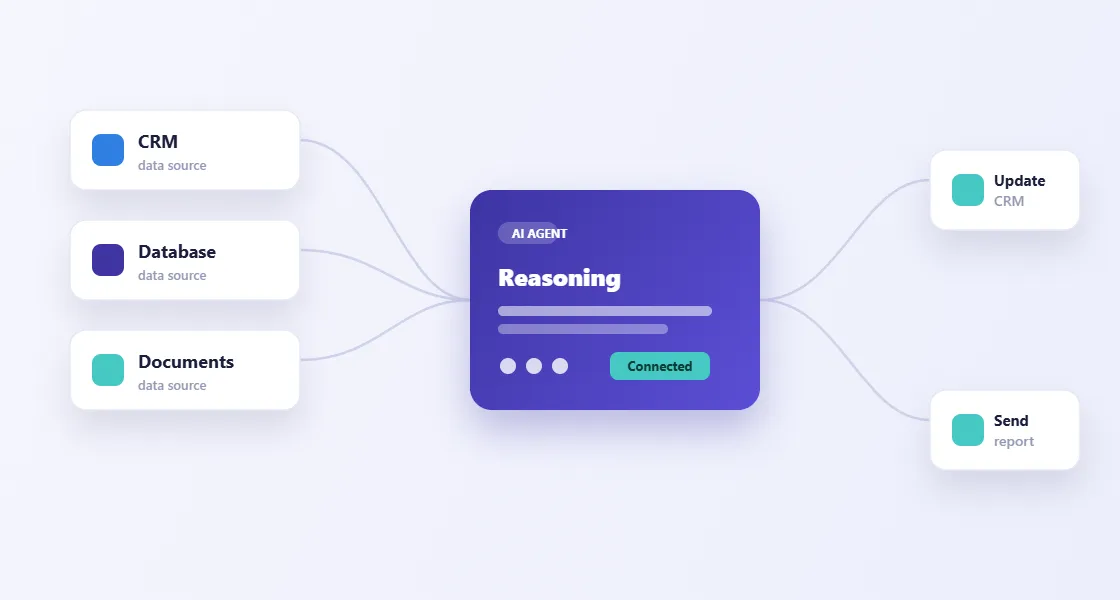
An AI forward deployed engineer works with your team to build AI into a specific business process. tPanel helps you choose a useful starting point, connect the systems involved and test the result with the people who will use it. The scope includes the work around the AI: data access, review screens, deployment and support.

Why Does an AI Pilot Get Stuck?
A prototype can look useful with a few examples. Daily work is less tidy: records are incomplete, staff have different access rights and someone has to deal with mistakes. These are often the gaps between a trial and a system the team can rely on.
- Staff still copy information from the CRM into a separate chat window.
- The output looks plausible, but nobody knows who should check it.
- The workflow has no plan for missing data or failed connections.
- The person who built the trial is no longer available to maintain it.
What Does an AI Forward Deployed Engineer Do?
The engineer works directly with the people who understand the process. That might mean watching how an operations manager handles a request, checking which records a reviewer needs, or testing an integration with your IT team.
tPanel then builds and adjusts the software around that work. Your team helps decide what a good result looks like and checks early versions before the workflow is released.
Find the slow handover
Watch a task with the people doing it. Note the inputs, decisions and waiting time.
Connect a working version
Use representative examples to build the workflow and connect the systems it needs.
Test with your team
Check the results, try exceptions and agree which actions still need approval.
Use it, then improve it
Release to the agreed users. Keep a record of issues and review changes before the next release.
Illustrative process - Select a step to see what happens.
Why Stay Close to the Team After Launch?
The first week often reveals things a test set missed: an unusual document, a customer with two records, or a review step that takes longer than expected. Staff also discover which parts save time and which need changing.
We use those examples to revise the workflow, test the changes and document the decisions. Changes to prompts, permissions and integrations are reviewed before they reach the live system.
What You Get from an AI FDE Engagement
The agreed scope sets out what will be built and how it will be accepted. Handover covers the workflow and the information needed to run it.
A connected workflow
The agreed AI task, connected to your systems and tested with representative examples.
Your source code
Source code, prompts, configuration and integration code, with access handed over to your team.
Review and fallback rules
Clear instructions for what needs approval, what happens on failure and who takes over.
Operating notes
How the workflow starts, which systems it uses, how to pause it and where to investigate a problem.
Test and change records
Examples tested, issues found and the reasons for important design decisions.
A handover discussion
We walk through the system with your team and agree on any remaining work or support.
Connecting AI to Your Existing Systems
An assistant needs the right records to be useful. A workflow also needs permission to write updates, create tasks or send messages. We define those access rules before connecting the AI to customer or operational data.
tPanel builds the underlying CRM systems, lead management tools and system integrations as well. Fixed steps such as reminders and data transfers can use business process automation; they do not need an AI model.
Decide What Needs a Person
Before launch, we agree which outputs staff must review and which actions the software may take on its own. A draft response, a payment decision and an internal summary need different levels of checking.
The workflow records what happened and routes failures to a named owner. Reviews reduce risk, but they do not make AI infallible. We test mistakes and missed cases as well as successful runs.
How We Work Through an AI FDE Project
Watch the work
Meet the people doing the task. Review the inputs, handovers and delays before choosing what to build.
Agree on a first workflow
Set a narrow scope, a budget and acceptance checks. Identify any data or access problems that could block delivery.
Test a working version
Build with representative examples, connect the required systems and let staff check the output.
Release and review
Roll out to an agreed group, watch for failures and refine the workflow before extending its use.
Choose a Scope That Fits
Focused sprint - 2-4 weeks
One bounded workflow. Suitable when the data and system access are ready and you want to test a specific improvement.
Extended sprint - 6-12 weeks
Several related workflows, or a first build with more integration and review requirements. We agree the sequence before starting.
Ongoing engineering support
Regular time for maintenance, testing and new work. Priorities and capacity are agreed as the needs of the business change.
Is AI FDE a Good Fit for Your Team?
This approach works best when you have a repeated, information-heavy task and someone on the team who can help us understand it. We also need access to the systems involved and permission to test with suitable data.
If the task follows straightforward rules, a simpler automation may be enough. If the source data is not usable yet, that needs work before an AI build can proceed.
What Does an AI FDE Engagement Cost?
tPanel charges A$100-140 per hour for senior development, or a blended A$90-120 per hour for a mix of senior and supporting work. The total depends on the agreed scope and engineering time.
A small first workflow may fit within A$3,000-6,000. That is a starting scope, not a price for every two-to-four-week engagement. Larger integrations and review requirements need a separate estimate. Ongoing support after handover is A$1,000 per month; the agreement sets out what is included.
For examples of the work, see AI workflow automation. Our software cost guide explains the factors behind a project estimate.
FAQ
Have another question? Tell us about the workflow you have in mind.
What does AI FDE mean?
AI FDE stands for AI Forward Deployed Engineer. The engineer works with your team to design, build and deploy AI in a specific business workflow.
How is it different from AI consulting?
The scope includes implementation: code, integrations, testing and rollout. Planning is part of the work, with a defined workflow to build and hand over.
How long does an engagement take?
A focused sprint is usually planned for 2-4 weeks. An extended sprint may take 6-12 weeks. Data readiness, system access and review requirements affect the schedule.
Who needs to be involved from our team?
We need someone who understands the workflow and someone who can arrange system access. They help check examples, answer questions and review working versions.
Can we add more workflows later?
Yes. Existing connections and review tools can often be reused, but each new workflow still needs its own scope and testing.
Do we own the code?
Yes. The custom source code, prompts, configuration and workflow logic are handed over to you. Any third-party services still have their own licences and running costs.
How do we start?
Book a discovery call and bring one task your team repeats regularly. We will discuss how it works now, what needs to change and whether AI is a useful part of the solution.
Working with clients across Australia
Based in Sydney, tPanel provides AI implementation for clients in Melbourne, Brisbane, Adelaide, Perth, Canberra, Hobart, Darwin and across Australia.
Remote collaboration can be combined with agreed on-site work when we need to observe how your team uses its systems and data.
Talk Through Your First AI Workflow
Tell us about one task your team repeats, the systems involved and what you would like to change.