lead management system

Lead Management System for Better Sales Follow-Up

Leads are valuable only if they are captured, assigned, followed up and measured.

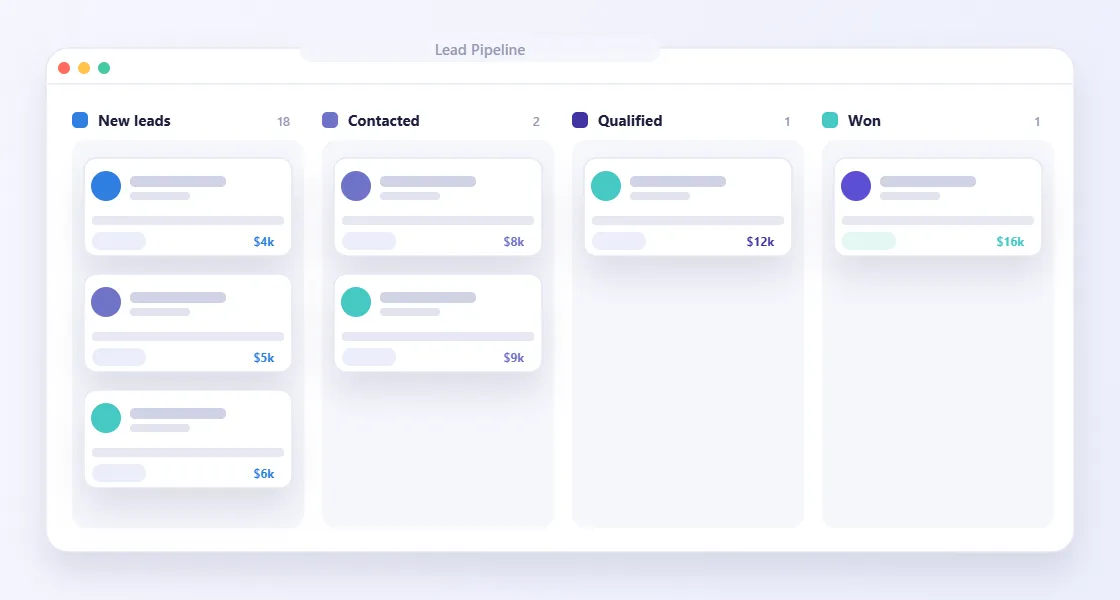
lead management system interface preview

tPanel builds custom lead management systems that help businesses track every enquiry from first contact to conversion, with clear ownership, reminders, status visibility and reporting.

If your leads come from multiple channels and too many follow-ups depend on memory, a lead management system can protect opportunities from falling through the cracks.

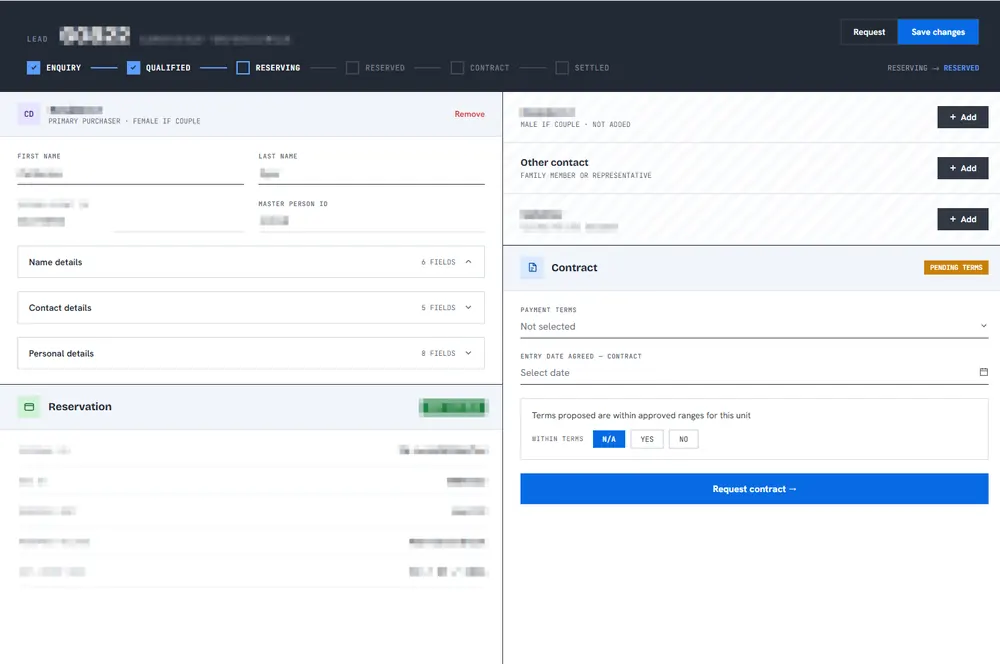
Lead management system showing a sales pipeline tracker from enquiry to qualified, reserving, reserved, contract and settled, alongside lead contact details and contract status
A real lead record from a system built by tPanel — pipeline stage tracking, contact details and contract status in a single view.
01

Where Leads Get Lost

Most lead problems are not caused by a lack of interest from customers.

They happen because the workflow after the lead arrives is unclear.

Common problems include:

  • Website form leads go to an inbox and wait too long
  • Advertising leads are downloaded manually
  • Salespeople do not know who owns each lead
  • Follow-up timing is inconsistent
  • Managers cannot see which leads are active, stale or lost
  • Lead source and conversion reports are unreliable
  • Customer details are copied into spreadsheets or CRM manually

A better system makes every lead visible and every next step clear.

02

What Does a Custom Lead Management System Include?

A lead management system covers the full path of an enquiry — capture, assignment, follow-up and reporting. tPanel builds each stage around how your sales team actually works:

Lead Capture

Collect leads from website forms, landing pages, ad platforms, referrals, imported lists, phone enquiries and third-party systems.

Lead Assignment

Route leads by location, product, service type, team member, priority, source or custom business rules.

Follow-Up Workflows

Create reminders, next-step tasks, status changes, notes and escalation rules so leads are followed up at the right time.

Sales Pipeline Visibility

See where every lead sits: new, contacted, qualified, quoted, follow-up due, won, lost or parked.

Reporting and Conversion Tracking

Understand which sources generate quality leads, where leads slow down and which follow-up actions improve conversion.

Integrations

Connect lead data with CRM, email, SMS, calendars, advertising platforms, dashboards and internal systems.

For sales teams that work on the move, lead follow-up can also be delivered through a mobile app.

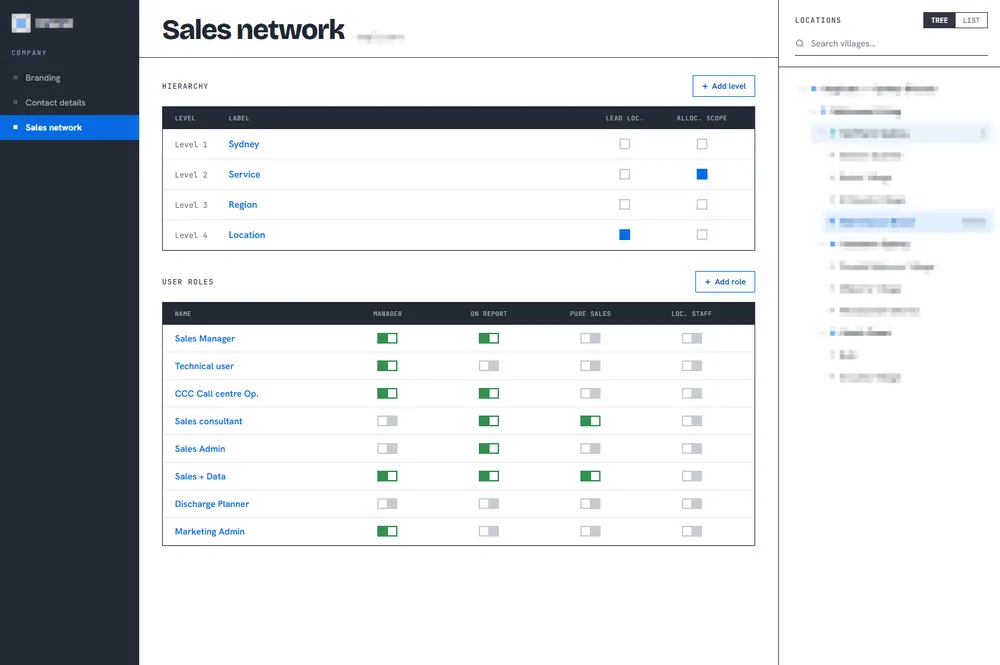
Lead assignment setup with a multi-level location hierarchy and a user-role permission matrix covering sales managers, sales consultants and admin roles
Lead routing and team permissions from a tPanel build — leads assigned by location and role across a multi-level sales network.
03

Designed for Sales Teams and Managers

Sales teams need a fast way to see what to do next.

Managers need confidence that leads are being handled consistently.

We design lead systems around both needs, so the daily workflow stays simple while the business gains better visibility.

04

How Does a Lead Management System Work?

A lead management system works by turning every enquiry into a tracked record with an owner and a next action, so no lead depends on someone's memory.

Map the Lead Journey

We identify where leads come from, what information is collected, who responds and what follow-up rules matter.

Build the Workflow

We design lead statuses, assignment rules, reminders, dashboards, permissions and integrations.

Launch and Improve

We help your team use the system, then refine reporting and automations as real usage reveals better ways to work.

05

How a Multi-Office Services Business Automated Lead Routing and Follow-Up

A services business with offices across several locations received customer enquiries from multiple channels. A coordinator had to work out which local office covered each customer's area, check who was rostered on that day, and hand the lead to a salesperson — who was then relied on to remember when to call back. Leads stalled when the coordinator was busy, the split between staff was uneven, and follow-up depended on memory rather than a process.

tPanel built a custom lead routing, tracking and CRM system. When an enquiry arrives, it is routed to the office covering the customer's location, anyone not rostered on that day is removed, and it is assigned to a salesperson by a fair-allocation rule so leads are shared evenly. The assigned salesperson gets an SMS, and a companion mobile app lets them call the customer and update the lead on the spot. A fixed follow-up cadence prompts them when the first call is due, then reminds them to follow up based on the last conversation. Every update is stored in the custom CRM and synced to the client's main CRM, such as HubSpot or Salesforce.

Enquiries are now assigned in seconds and shared fairly across the team, instead of waiting in a queue for a coordinator. Salespeople work from their phones with a clear next action, follow-ups happen on schedule rather than from memory, and managers get a reliable record of every lead and its progress — while the business keeps its existing CRM as the system of record.

06

What Clients Say

We've worked with tPanel for more than ten years, starting with the development of a sales CRM and continuing to evolve it ever since. During that time, the team has delivered major product builds, integrations, automations and companion applications, tackling complex technical challenges with professionalism and expertise. They have always been responsive, accountable and easy to work with. tPanel consistently delivers high-performing, reliable and secure solutions, making them a trusted long-term partner.

— Scott G. · Director, Particle Sales Accelerator · 10-year client

The tPanel team deliver quality software at a reasonable price, providing real value. They support what they build, which is the element that makes the solution a success. The level of skill and ability to manage complex cloud environments and complex APIs is high. The team is very much aware of how to build secure platforms that protect client information from unauthorised access. The commitment to prompt problem resolution is very high. I would recommend tPanel.

— Bryn N. · CTO, Particle Sales Accelerator
07

How Much Does a Lead Management System Cost in Australia?

Most custom lead management systems in Australia cost between A$12,000 and A$45,000. A system covering multi-channel lead capture, assignment rules, follow-up scheduling, reporting and integrations with your existing CRM sits in that mid bracket; a single lead workflow — for example capturing enquiries from one channel and routing them to the right salesperson by SMS — can be delivered for A$3,000–6,000.

The structural difference from per-seat lead tools is the ongoing cost. tPanel charges a fixed A$1,000 per month for maintenance and support — no per-seat fees, so adding salespeople or offices does not change the price. Subscription lead platforms charge per user per month, which climbs every time the sales team grows.

  • Single lead workflow: A$3,000–A$6,000 one-off
  • Full lead management system: A$12,000–A$45,000 one-off
  • Support: fixed A$1,000/month, no per-seat fees

A lead management system is often the first module of a wider custom CRM. For the full cost breakdown across project types, read the custom software cost guide for Australia.

FAQ

FAQ

What is a lead management system?

A lead management system captures, organizes, assigns, tracks and reports on sales enquiries so teams can follow up consistently.

How is lead management different from CRM?

Lead management focuses on the journey from enquiry to qualified opportunity or sale. CRM is broader and may include long-term customer history, accounts, service and reporting.

Can the system capture leads from our website?

Yes. tPanel can connect website forms, landing pages, ad leads and third-party sources into one lead workflow.

Can follow-up reminders be automated?

Yes. The system can create reminders, tasks, overdue alerts and escalation rules based on lead status and timing.

Stop Losing Leads After They Arrive

If your team is generating leads but struggling to track ownership, follow-up and conversion, tPanel can build a lead management system around your sales workflow.