By Tim Wang - Development Manager, tPanel - LinkedIn -> - Updated 16 October 2026
Off-the-shelf CRMs like Salesforce, HubSpot, Zoho, Pipedrive and Microsoft Dynamics 365 are the right choice when your sales process is fairly standard and you want to start fast with a low upfront cost. A custom CRM is worth it when your sales or operations workflow is specific, you are paying for features you do not use, or the CRM has to fit how your team actually works instead of forcing your team to work around the tool. The decision is rarely about which product has more features - it is about fit, cost over time, and who owns the system.
Most Australian businesses should start with an off-the-shelf CRM, and many never need anything else. The case for a custom CRM appears later: when growth, headcount, or a workflow that does not look like a generic sales pipeline starts to make the standard tool the bottleneck rather than the solution. This guide explains what each option does well, exactly when a custom build is justified, and the middle ground most teams overlook.
What Off-the-Shelf CRMs Do Well - and Where They Hit Limits
An off-the-shelf CRM is a ready-made product you subscribe to per user per month. It ships with contacts, companies, a sales pipeline, email tracking, reporting and a marketplace of integrations. For a team running a recognisable sales motion - leads come in, get qualified, move through stages, and close - these tools are excellent value. You can be live in days, the vendor handles hosting and updates, and the per-seat price is small at low headcount.
The main products sit at different points on the scale: Salesforce is the deeply configurable enterprise standard; HubSpot leads with marketing and ease of use for small to mid teams; Zoho CRM is the budget all-rounder; Pipedrive is a lightweight, pipeline-first tool for smaller teams; and Microsoft Dynamics 365 suits organisations already on Microsoft 365, where tight Outlook and Teams integration is the draw. Pricing tiers change regularly, so check current pricing before you build a business case.
The limits show up as you grow or as your process diverges from the template the product was built around:
- Per-seat cost at scale. A few users is cheap; 40, 80 or 200 users on a mid-tier plan becomes a significant recurring cost in AUD that never stops and rises with headcount.
- Generic workflow. The pipeline assumes a standard sales process. If your business runs quoting, projects, recurring service, field operations or a multi-step approval that does not look like "lead -> deal -> won", you bend your process to fit the tool.
- Feature bloat. Higher tiers bundle marketing, service and analytics modules you may never use but still pay for, while the one capability you actually need sits behind the most expensive plan.
- Limited deep customisation. Custom fields and automation rules go a long way, but you cannot change the underlying data model or core logic. When the product simply does not work the way your business does, there is a ceiling you cannot raise.
When Is a Custom CRM Worth Building?
A custom CRM is software built specifically for your business - your data model, your pipeline, your rules, your integrations - and owned by you rather than rented. It is worth building when the cost of the standard tool not fitting outweighs the cost of building something that does. Use this checklist; if two or more are true and the process is core to your revenue, a custom CRM is likely justified:
- Your sales or operations workflow does not map to a standard pipeline - you run quoting, projects, recurring service, dispatch, or multi-stage approvals the CRM cannot model.
- Your team has built spreadsheets, manual workarounds and shadow processes around the CRM because it does not do what they need.
- Per-seat licensing has become expensive at your headcount, and the cost climbs every time you hire.
- You are paying for tiers and modules to unlock one feature, while leaving most of what you pay for unused.
- The CRM must connect deeply with internal systems - billing, inventory, a production database, a customer portal - that the off-the-shelf product cannot reach cleanly.
- The customer or sales process is a genuine competitive advantage, and you want it to work exactly your way rather than the way a vendor decided.
If only one item is true, it is usually cheaper to customise or integrate your existing CRM (see section 06). When several are true at once, that is the signal to look at custom CRM development. tPanel builds CRMs around the workflow a business already runs, as part of the broader family of custom business software we design for Australian teams.
Does a startup need a custom CRM?
Usually, a startup should begin with an off-the-shelf CRM that supports its current sales process. A changing offer, a small contact list or a limited budget makes a bespoke build harder to justify. Configure ownership, pipeline stages and follow-up reminders first, then check what still prevents the team from doing its work.
Consider custom development when a repeatable, important workflow cannot be supported through configuration or a practical integration. Document the limitation and compare the cost of workarounds with development, migration, training and ongoing support. Start with the smallest missing capability; you may be able to keep the existing CRM. Being a startup is not, by itself, a reason to build.
Custom CRM vs Off-the-Shelf: Side-by-Side Comparison
This table compares the two approaches across the dimensions that usually decide the call. Neither column is the winner - the right answer depends on which dimensions matter most to your business.
| Dimension | Off-the-shelf CRM | Custom CRM |
|---|---|---|
| Cost model | Low upfront, recurring subscription per user per month | Larger one-off build, then hosting and maintenance |
| Fit to sales process | Good for standard pipelines; you adapt to the tool | Built around your exact workflow |
| Customisation | Fields, rules and automation within product limits | Unlimited - data model and logic are yours |
| Integrations | Marketplace connectors; deep links can be constrained | Built to connect with any internal system |
| Per-user cost at scale | Rises with every seat; expensive at high headcount | No per-seat fee - cost is roughly flat as you grow |
| Ownership | Vendor owns the platform and roadmap | You own the software, data and direction |
| Time to first usable version | Days to a few weeks | Weeks to a few months for a first usable version |
Cost and Timeline Expectations
The honest trade-off is upfront cost versus ongoing cost. An off-the-shelf CRM costs little to start but charges per user per month for as long as you use it - a cost that scales with your team and never ends. A custom CRM is a larger upfront investment in AUD because you are paying to build software rather than rent it, plus modest ongoing hosting and maintenance, but there is no per-seat licence.
Project cost depends on scope: the number of workflows, how many systems it integrates with, whether it includes a customer-facing portal, and how much data has to be migrated. A focused CRM that replaces a painful spreadsheet-and-tool stack is a smaller build than a platform that runs quoting, projects, billing and field operations end to end. As an illustrative range, a custom CRM that replaces spreadsheets plus disconnected email and a couple of point tools typically falls in the A$15,000-35,000 band for a first build, sitting at the lower-to-middle end of the A$12,000-45,000 range we use for mid-size custom systems. A build that also absorbs quoting, billing or field operations pushes toward the top of that range and beyond. Treat these as planning figures, not a quote - the only accurate number comes from scoping your actual workflow. A first usable version typically takes weeks to a few months, and most teams launch a core version first, then extend it. For a structured breakdown of what drives the numbers, see our guide on custom software cost in Australia. The same build-versus-buy logic, applied beyond CRM, is covered in custom software vs off-the-shelf.
A worked break-even example (illustrative)
Per-seat licensing is the figure that makes the build-versus-buy maths concrete, so it helps to work an example. Every number below is an assumption to show the method - substitute your own and check current vendor pricing before relying on it.
- Assume 20 users on a mid-tier off-the-shelf CRM plan at around A$90 per user per month (illustrative - check current pricing).
- That is 20 x A$90 = A$1,800 per month, or A$21,600 per year in licence fees alone, before add-on modules or annual price rises.
- Assume a custom CRM build of A$30,000 (a mid-size system), maintained for a flat A$1,000/month = A$12,000/year - no per-seat fee.
- Assume A$12,000/year for custom maintenance against A$21,600/year in SaaS licence fees: a difference of A$9,600/year. This is not the net saving after all running costs.
- Under these assumptions, A$30,000 / A$9,600 = 3.125 years (about 38 months). This compares the build with the licence-versus-maintenance difference only, before other costs.
Costs not modelled above: setup and data migration for either option; training; custom hosting and storage; paid APIs, AI usage and other subscriptions; and later changes outside the maintenance agreement. Add one-off items to the upfront total and recurring items to each year. Use the same GST basis for both proposals and confirm whether quoted prices include it. The A$12,000 maintenance assumption is not an all-inclusive operating budget.
Recalculate when user numbers or subscription prices change, and check whether custom hosting, service usage or support also increases. For example, an assumed extra A$3,000 a year on the custom side, with SaaS costs unchanged, reduces the annual difference from A$9,600 to A$6,600 and extends the calculation to about 4.5 years. This is an illustration, not a forecast.
The Middle Ground: Customise or Integrate Instead of Replace
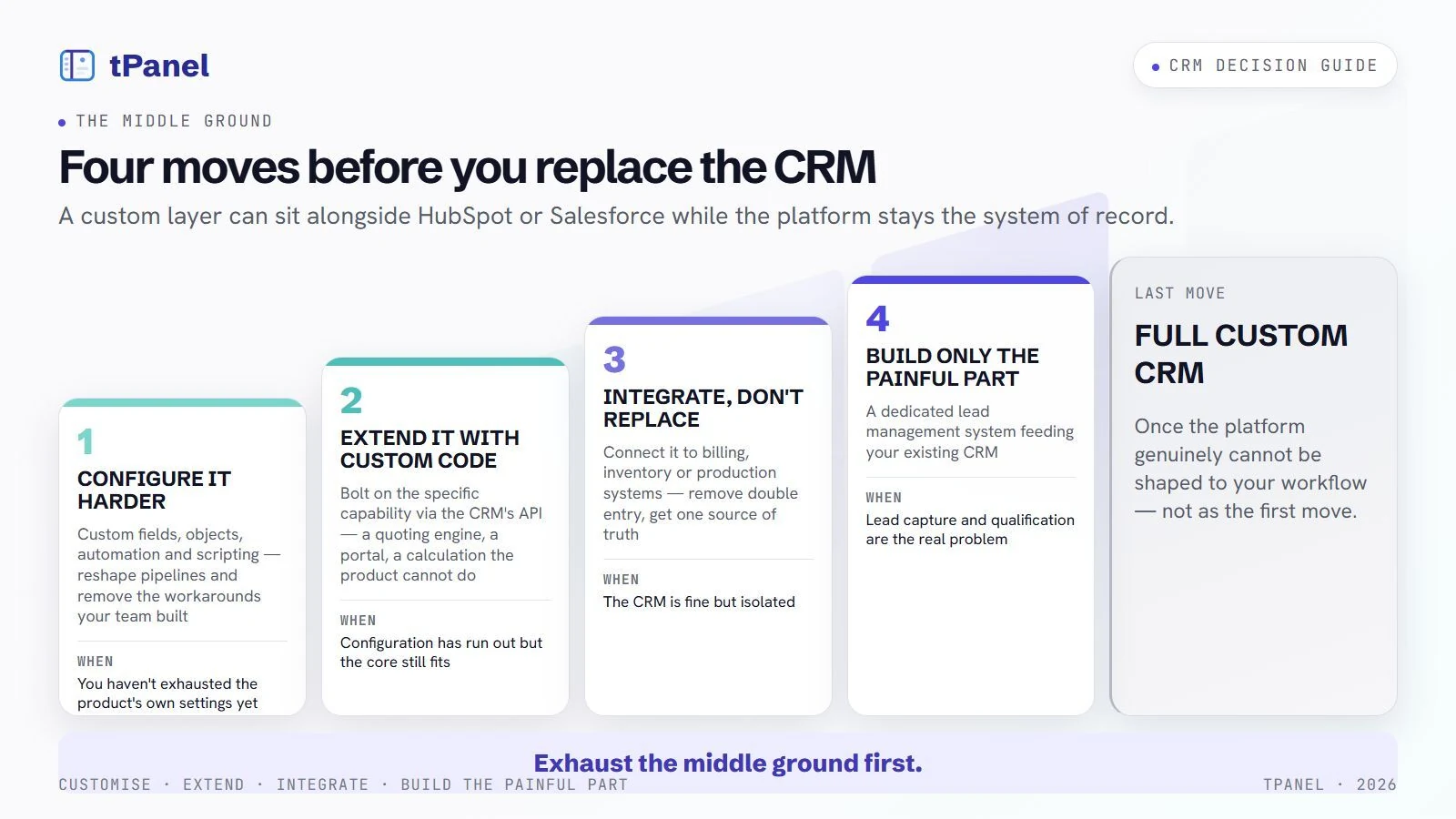
Replacing a CRM is not the only option: a custom layer can sit alongside HubSpot or Salesforce, fixing the workflow while the platform stays the system of record.
Customise your existing CRM
Most off-the-shelf CRMs allow custom fields, custom objects, automation and scripting. Before replacing the platform, it is often cheaper to configure it harder - reshaping pipelines, automating the manual steps, and removing the workarounds your team built.
Extend it with custom code
When configuration runs out, the CRM's API lets you bolt on the specific capability you need - a quoting engine, a custom portal, a calculation the product cannot do - without abandoning the parts that already work.
Integrate, don't replace
Often the CRM is fine but isolated. Connecting it to billing, inventory or your production systems removes double entry and gives one source of truth. System integration services can join your tools so data flows automatically.
Build only the painful part
If lead capture and qualification are the real problem, a dedicated lead management system feeding your existing CRM can solve it without a full rebuild.
tPanel's usual recommendation is to exhaust the middle ground first. A full custom CRM makes sense once the platform genuinely cannot be shaped to your workflow - not as the first move.
A real workflow to test against
The Particle property sales CRM case study shows lead allocation, conversation history, scheduled follow-up, property reservations and settlement tracking in one application. These are the workflows to test when comparing a configured CRM with a custom build. The case study documents what was built; it does not prove that a packaged CRM could never support the same needs.
Give each shortlisted supplier the same example: assign an enquiry, record a conversation, reserve a property and hand the record to another consultant. Record what works through configuration, what needs an integration and what requires custom code. Compare those gaps alongside migration, support and ongoing costs.
Adoption and Change Management: Why CRMs Fail
The most common way a CRM project fails has nothing to do with the software - the team quietly keeps working in spreadsheets and the CRM becomes a half-empty database nobody trusts. A new system, custom or off-the-shelf, only delivers value when people use it consistently. Adoption is work you plan for, not something that happens because the tool went live.
- Bring a few users in before launch. Involve two or three people who will use the CRM daily while it is still being shaped. They catch the awkward steps early and become advocates instead of sceptics at go-live.
- Train by role, not by feature. A salesperson and an operations lead need different things. Short, role-specific training on the handful of screens each person actually uses beats a long generic walkthrough nobody remembers.
- Run a real rollout, not a switch-flip. Pick a start date, migrate the data, retire the old spreadsheets deliberately, and make the CRM the single source of truth from day one so people are not maintaining two systems in parallel.
- Close the loop in weeks 1-4. Gather feedback in the first month and fix the friction fast - a missing field, a clumsy step, a report that does not match how the team thinks. Early responsiveness is what turns a launch into a habit. A custom build has the edge here because you can change the software to fit the team; with an off-the-shelf product you are limited to what the vendor allows.
This is where a CRM built around how your team already works pays off: when the system removes steps instead of adding them, adoption is far easier to win, because you are not asking people to change how they work just to feed a tool.
Getting Your Data Across Cleanly
Alongside adoption, the other thing the comparison tables never mention is getting your data across without losing it. A custom CRM build from tPanel treats migration as core work, not an afterthought - the same way we approach every custom software development project.
- Mapping. Your existing contacts, companies, deal history, notes and activity are mapped to the new structure before anything moves.
- Cleaning. Records are de-duplicated and tidied during migration, so you do not carry years of mess into the new system.
- Test migration. A trial run validates that nothing is lost or mangled before the real cut-over.
Whether you keep an off-the-shelf CRM, customise it, or build a custom CRM, the goal is the same: a system that fits the way your business actually runs. If you are weighing up the options, tPanel can help you decide honestly - including telling you when off-the-shelf is the right answer.
Frequently asked questions about custom vs off-the-shelf CRM
Can't see your question here? Tell us what you're trying to build and we'll answer it directly - no sales script.
Custom CRM vs off-the-shelf - which is better?
Neither is better in every case. An off-the-shelf CRM like Salesforce, HubSpot, Zoho, Pipedrive or Microsoft Dynamics 365 is better when your sales process is fairly standard and you want to start quickly with low upfront cost. A custom CRM is better when your workflow is specific, you are paying for features you never use, or the tool has to fit how your team actually works rather than the reverse. The deciding factor is fit, not features.
When should a business build a custom CRM?
Build a custom CRM when your sales or operations workflow does not map to a standard pipeline, when you are forcing staff to work around the tool with spreadsheets and manual steps, when per-seat licensing is becoming expensive at your headcount, or when the CRM needs to connect tightly with internal systems an off-the-shelf product cannot reach. If two or more of these are true and the process is core to your revenue, a custom build usually pays back.
Is a custom CRM more expensive than Salesforce or HubSpot?
A custom CRM has a larger upfront cost because you are paying to build software rather than rent it, typically a one-off project investment in AUD plus ongoing hosting and maintenance. An off-the-shelf CRM has little upfront cost but charges per user per month indefinitely. Over several years and with a larger team, custom ownership can be cheaper because there is no per-seat fee, but the build has to be justified by fit, not just licence savings.
Can you customise an existing CRM instead of building one?
Yes, and it is often the right middle ground. Most off-the-shelf CRMs offer custom fields, automation, and APIs you can extend, and you can integrate the CRM with your other systems rather than replacing it. tPanel often recommends customising or integrating an existing CRM first, and only building a custom CRM when the platform genuinely cannot be shaped to your workflow.
Can you migrate our existing CRM data?
Yes. Migrating contacts, companies, deal history, notes and activity from an existing CRM or spreadsheets is a standard part of a custom CRM project. tPanel maps your current data to the new structure, cleans and de-duplicates records, runs a test migration, and validates the result with your team before go-live so nothing is lost in the move.
Not sure whether to build or buy your CRM?
Tell us how your team sells and operates, and tPanel will give you an honest recommendation - off-the-shelf, customise, or custom build.