By Tim Wang - Development Manager, tPanel - LinkedIn -> - Updated 23 September 2026
Custom software can be worth it for a mid-size Australian business when a recurring workflow problem costs more than a suitable system would cost to build and run. Company size alone is not a reason to build. Compare a ready-made product, an integration and a custom system against the same work, budget and delivery risks.
This guide helps you make that decision with a side-by-side comparison, practical scenarios and an AUD cost example. tPanel builds custom systems, so we also explain when to keep your existing software or postpone development.
Is it worth it for your business? | Compare full costs and payback | Prepare a decision brief
What Is Off-the-Shelf vs Custom Software?
Off-the-shelf software is a ready-made product built once and sold to many customers - think accounting tools, email platforms, project boards and most CRMs. You subscribe or buy a licence, configure a few settings, and use it as designed. It is sometimes called packaged, commercial or SaaS software.
Custom software is built specifically for your business and your process. Instead of adapting how you work to fit a product, the product is shaped around your workflow. It can be a standalone system or a layer that sits on top of tools you already use. tPanel builds these as custom business software - web and mobile systems, internal tools, dashboards and automations designed around one company's way of operating.
The decision between them is the classic "build vs buy" question. Off-the-shelf trades fit for speed and low upfront cost. Custom trades upfront cost and time for a system that matches your process exactly and that you own outright. Everything below helps you weigh that trade for your situation.
Custom vs Off-the-Shelf: Side-by-Side Comparison
The table below compares the two across the dimensions that matter most. There is no column that is "better" everywhere - each path is stronger on some rows and weaker on others.
| Dimension | Off-the-shelf | Custom |
|---|---|---|
| Upfront cost | Low - often free to trial, then a monthly fee | Higher - a project build paid before you see value |
| Time to value | Fast - usable in days or weeks | Slower - weeks to months to design and build |
| Fit to workflow | You adapt to the tool; some processes won't fit | Exact - built around how you actually work |
| Scalability | Scales technically; cost climbs with each seat | Capacity and support costs can grow with usage |
| Integrations | Limited to what the vendor supports | Depends on API access, limits and integration scope |
| Ownership / IP | You licence the product; check data and export rights | Code and IP rights depend on the development agreement |
| Maintenance | Vendor handles it; you accept their roadmap | You fund maintenance; you control the roadmap |
| Per-seat cost over time | Recurring per user - grows as the team grows | Usually flat - add users without per-seat fees |
The pattern is clear: off-the-shelf is strongest on speed and upfront cost, custom is strongest on fit, ownership and long-run cost at scale. The next two sections turn that into a yes/no decision.
When Is Off-the-Shelf the Right Call?
For a large share of business needs, buying is simply the right answer. If a proven product already does the job, building your own version is wasted money and risk. Off-the-shelf is the right call when most of these are true:
- Your need is standard and common - accounting, payroll, email, video calls, document storage, basic scheduling.
- An existing product already covers most of your requirements out of the box.
- You can adapt your process to the tool without real pain or lost revenue.
- You need something working now, and speed matters more than a perfect fit.
- Upfront budget is tight and a low monthly fee is easier to justify than a project build.
- The function is not a source of competitive advantage - doing it differently wins you nothing.
Be honest here: many "we need custom" instincts are really off-the-shelf problems in disguise. If a packaged tool handles your essential requirements and the remaining compromises are manageable, buying or configuring it may be enough. Custom is worth its cost only when that missing slice genuinely holds the business back. For a tighter test on one common case, see our guide on custom CRM vs off-the-shelf.
Is Custom Software Worth It for a Mid-Size Australian Business?
It can be, when your team repeatedly works around a gap that available products cannot reasonably solve, and the expected benefit justifies the full cost and risk. Start with one workflow and measure the delays, duplicate entry or paid manual work it creates. Then test the best available product and integration options before commissioning a build.
When a custom build is worth investigating
- The process has specific requirements. For example, an operations team needs job allocation, approvals and customer reporting that available products cannot handle together.
- The problem repeats at meaningful volume. Staff regularly reconcile orders, correct records or chase information. Record the frequency and time spent rather than relying on a rough impression.
- The workflow is stable enough to scope. An internal owner can explain the rules, exceptions and acceptance criteria, and make time for testing and training.
- The business can fund ownership. The budget covers development, migration, support and later changes, including a slower launch or lower adoption than expected.
When connecting existing tools may be enough
Suppose an Australian wholesaler already has suitable accounting and inventory software, but staff copy orders between them. Check the available connectors and API access first. A focused system integration may solve the problem while keeping both products. A full replacement only deserves consideration if important requirements remain unmet.
When to buy, configure or wait
If a packaged CRM supports the sales process but staff have not configured its stages or reports, try configuration and training first. If the process changes every month, agree how it should work before building. If the problem costs little and budgets are tight, a simpler process change may be the better investment.
These are decision scenarios, not client results or fixed headcount thresholds. The signs you need custom software help identify a problem; the next step is proving which response is proportionate.
What an Australian business should confirm
- Comparable AUD budgets: use the same GST basis and allow for exchange-rate changes on overseas subscriptions.
- Operational fit: check the accounting, payroll, warehouse or customer systems you actually use, including API limits and data export.
- Support and data requirements: agree support hours for your team's time zones, hosting arrangements, access controls and any contractual requirements before selecting an option.
- A workable handover: confirm source-code rights, account access, documentation and who will maintain the system if the original developer is unavailable.
Budget for delivery risk
A custom build needs scope, integration checks, testing and a rollout plan. Packaged software also takes work to configure, migrate and introduce to staff. Ask each supplier to identify assumptions and exclusions, then start with the smallest release that completes a useful workflow. Set a review point before funding the next stage.
The Hybrid Approach: Custom Built Around SaaS
The choice is rarely all-or-nothing. The approach that suits most businesses is a hybrid: keep proven off-the-shelf tools for commodity functions, then build custom only where your process is unique. You don't rebuild email or accounting - you build the layer that ties everything together and handles the work no packaged tool does well.
Keep the commodity SaaS
Proven platforms stay where they already work - accounting, payroll, email, and even your e-commerce engine. There's no advantage in rebuilding these, and the vendors maintain them for you. Example: an online retailer keeps Magento running its storefront and product catalogue rather than replacing the platform.
Build the custom layer
A custom system handles the parts the platform does badly or not at all, and becomes the place your team actually works. Example: that retailer runs a custom admin built over Magento's database - bulk product uploads and stock updates from Excel, a drag-and-drop newsletter builder with one-click send, and automatic supplier stock feeds - work that took three to five staff now done by one.
Connect with integrations
System integration wires the custom layer to everything else, so data flows automatically instead of being copied by hand. Example: the same admin reads and writes Magento's database directly, pulls stock updates from suppliers, and embeds Zoho's helpdesk so support tickets are handled in the one back office.
This model gives you the reliability and low maintenance of SaaS for the boring parts, and the exact fit of custom only where it pays off. It also keeps the build smaller and cheaper, because you're not reinventing tools that already work. A hybrid often starts as a thin custom layer plus a few integrations, then grows as you find more processes worth absorbing.
Total Cost of Ownership Over 3-5 Years
Comparing only the upfront price is misleading. The fair comparison is total cost of ownership over three to five years, and here the two paths behave very differently - so be honest about which one your numbers actually favour.
For a packaged product, include licences, setup, configuration, migration, training, integrations and paid add-ons. Check the actual tier and user count you need, renewal terms and the cost of running old and new systems together during rollout.
For custom software, include discovery, development, testing, migration, training, hosting, support, third-party services and later changes. tPanel's indicative build budgets are explained in the Australian software cost guide. They are planning ranges, not a national price survey.
Allow for ongoing support
tPanel's optional managed hosting, maintenance and support starts at A$1,000 + GST per month for a standard scope. Larger or more complex systems need an agreed quote. Third-party usage and new development are separate; confirm what is covered so hosting or support is not counted twice.
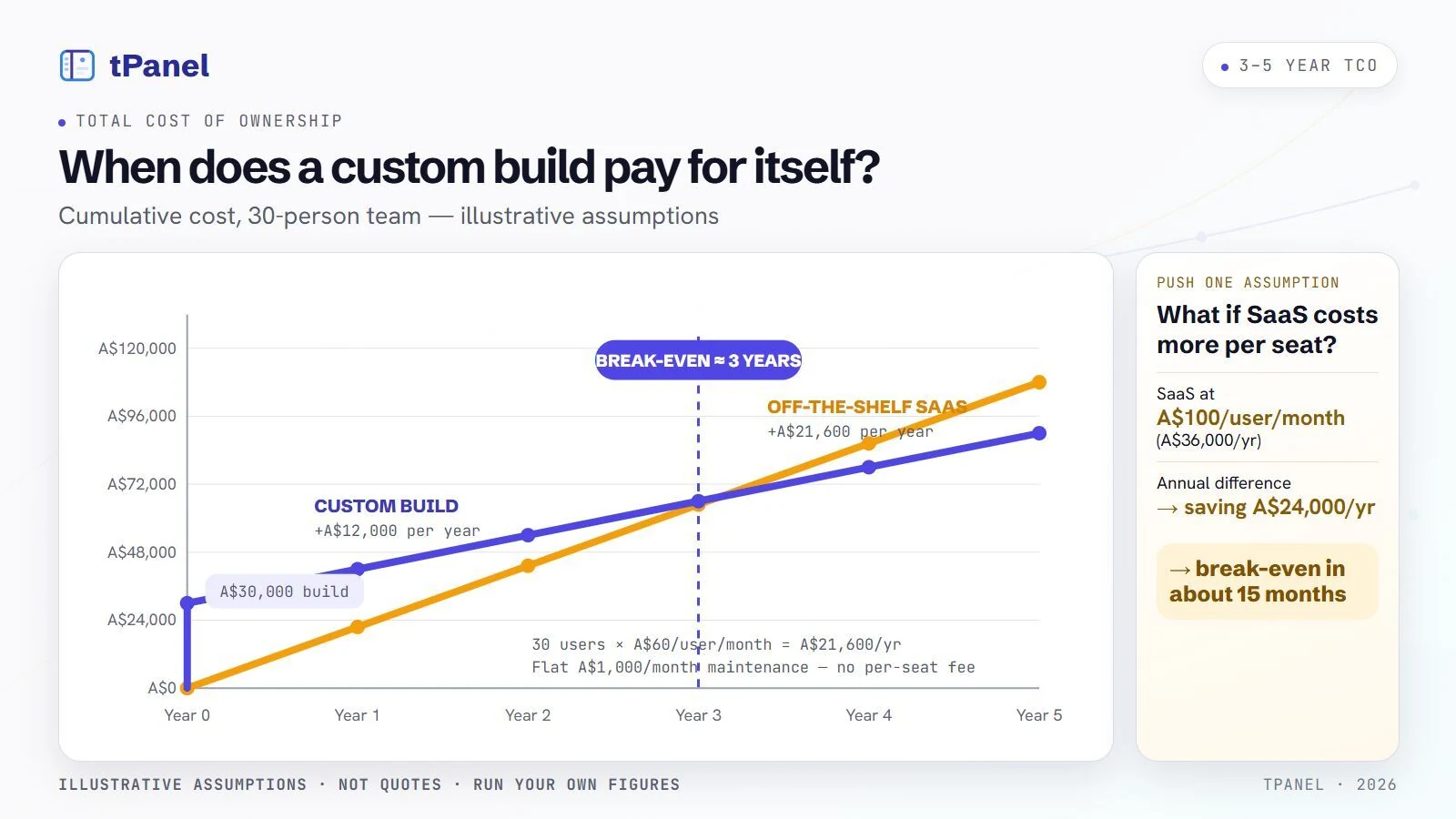
Worked example: a break-even (all figures illustrative assumptions)
All figures below are illustrative AUD assumptions excluding GST, not quotes or promised returns:
- Assume a 30-person team on SaaS at A$60 per user per month (an assumed price, not a vendor quote).
- SaaS cost per year: 30 x A$60 x 12 = A$21,600/year - and it rises with every new hire.
- Assume a custom build of A$30,000 (a mid-size system) that replaces that tool.
- Assume A$12,000/year for custom maintenance against A$21,600/year in SaaS licence fees: a difference of A$9,600/year. This is not the net saving after all running costs.
- Under these assumptions, A$30,000 / A$9,600 = 3.125 years (about 38 months). This compares the build with the licence-versus-maintenance difference only, before other costs.
Costs not modelled above: setup and data migration for either option; training; custom hosting and storage; paid APIs, AI usage and other subscriptions; and later changes outside the maintenance agreement. Add one-off items to the upfront total and recurring items to each year. Use the same GST basis for both proposals and confirm whether quoted prices include it. The A$12,000 maintenance assumption is not an all-inclusive operating budget.
Recalculate when user numbers or subscription prices change, and check whether custom hosting, service usage or support also increases. For example, an assumed extra A$3,000 a year on the custom side, with SaaS costs unchanged, reduces the annual difference from A$9,600 to A$6,600 and extends the calculation to about 4.5 years. This is an illustration, not a forecast.
Calculate cash payback using the full difference
Simple cash payback = additional upfront cost / annual net cash benefit. Additional upfront cost is the custom option's one-off spending minus the alternative's one-off spending. Annual net cash benefit includes subscriptions you can actually cancel and other cash costs avoided, less additional operating costs. If that annual benefit is zero or negative, this calculation gives no cash payback.
Extend the example: assume custom migration and training add A$10,000, the alternative needs no setup spending, and additional custom running costs are A$3,000 a year. Payback becomes A$40,000 / A$6,600 = about 6.1 years after the assumed full annual benefit begins. The earlier 38-month figure is therefore not a complete investment forecast.
Saved staff time is capacity, not automatically cash
Suppose a team saves 10 hours a week across 46 working weeks. At an assumed loaded labour cost of A$60 an hour, that is A$27,600 of annual capacity value. If salaries and staffing stay unchanged, it is not A$27,600 less cash leaving the business. Explain whether the freed time will reduce paid overtime, avoid a planned hire or allow more customer work.
- Count a cash saving only when spending can actually fall; avoid counting the same staff hours as both cash savings and capacity value.
- For extra sales, estimate additional contribution after delivery costs, not the full sales revenue. Do not also count the same recovered hours as a separate benefit.
- Model rollout delays, training time and lower adoption. Recalculate with half the expected time saving and a higher maintenance allowance.
- Compare annual cash flows over three to five years, including implementation timing. Simple payback omits the time value of money and benefits after payback.
A real example. A tPanel client prepares product quotes for large online deal and marketplace platforms (the kind run by OzSale, Catch and Groupon). Their selection, product imagery and pricing used to be a manual back-and-forth between a local team and an overseas one: the overseas team assembled files into a shared cloud drive, the local team opened each document, checked the images and prices, made adjustments, then sent the result to the platform - and every single product quote took a long time. tPanel built a custom system that pulls the product images, generates the quote file, lets the team adjust pricing and sends it to the platform automatically, while recording cost and order data so a profit report falls out at the end. It cut the time spent on that daily repetitive work by around 80% and gave the business a far more structured process. The build was paid for once; the labour it returns comes back every day.
A Short Decision Checklist
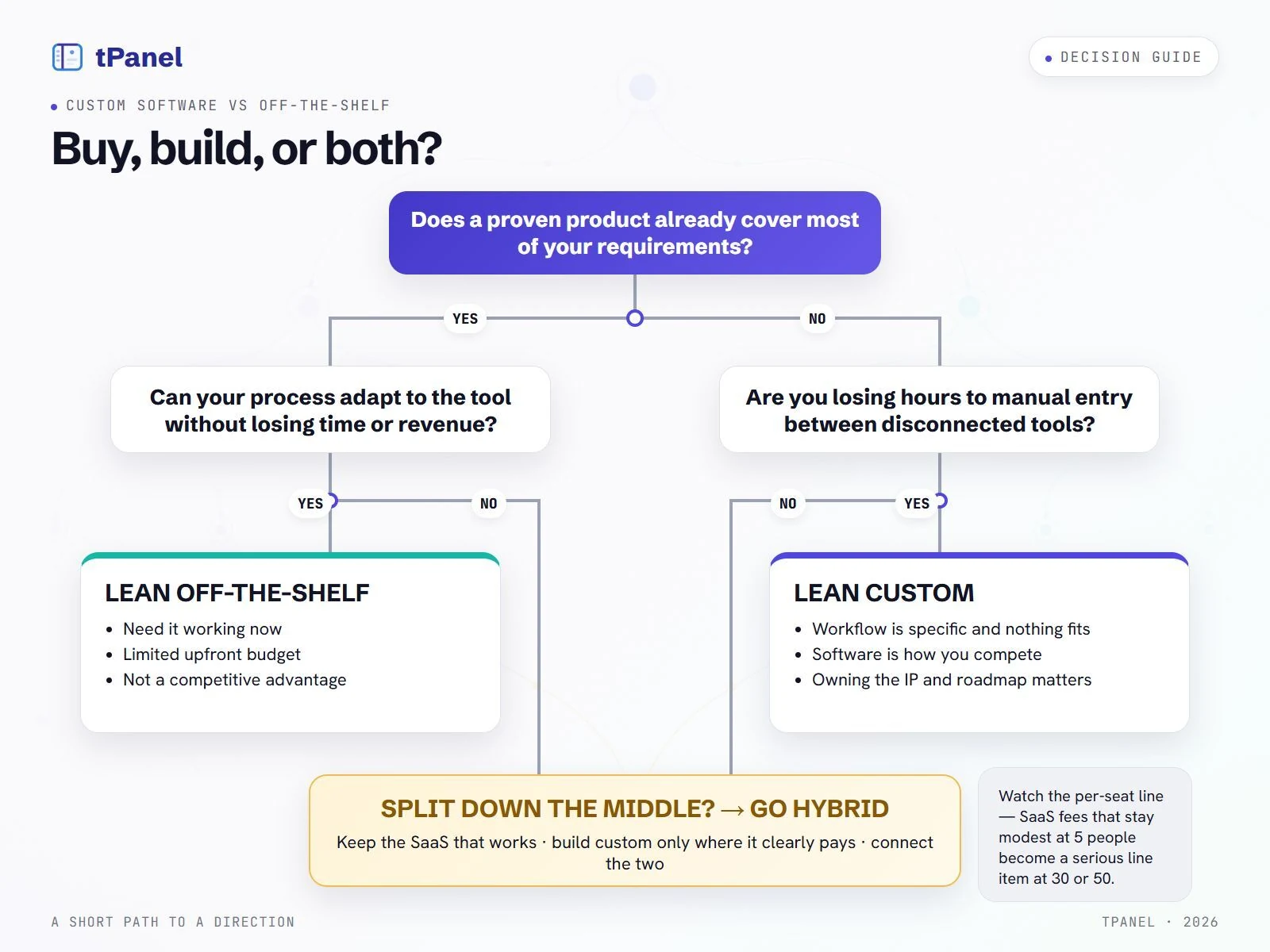
Use these prompts to prepare a decision, not as a score where the most ticks wins. One essential requirement can matter more than several preferences.
Lean off-the-shelf if:
- A proven product already covers most of your requirements.
- Your process can adapt to the tool without losing time or revenue.
- You need it working now and upfront budget is limited.
- The function isn't a source of competitive advantage.
- Your team is small enough that per-seat fees stay modest.
Lean custom (or hybrid) if:
- Your workflow is specific and no off-the-shelf tool fits it well.
- You're losing hours to manual data entry between disconnected tools.
- The software is part of how you compete or run leaner than rivals.
- Per-seat SaaS fees have grown large across a bigger team.
- Owning the system, the IP and the roadmap genuinely matters.
Before asking for a quote, write down one workflow, its current volume and cost, the tools involved, and the outcome you need. Add an internal owner, a budget for running the system and a measurable acceptance check. Bring that brief to a custom software development discussion so the options can be scoped against the same requirements.
Frequently asked questions about custom vs off-the-shelf software
Can't see your question here? Tell us what you're trying to build and we'll answer it directly - no sales script.
How long does custom software take to pay for itself?
There is no universal payback period. Compare the additional upfront cost with annual net cash benefits after hosting, support, subscriptions and later changes. Include migration, training and rollout delays. Saved staff time is capacity value unless it reduces spending or creates measurable additional contribution. If annual net cash benefits are not positive, there is no cash payback under those assumptions.
Is custom software better than off-the-shelf?
Neither is better in every case. Off-the-shelf software is better when your need is common and well-served by an existing product, because it is cheaper upfront and faster to start using. Custom software is better when your workflow is specific, integration-heavy, or a competitive advantage, because it fits exactly how you work and you own it. The right choice depends on how unusual your process is and how central the software is to how you make money.
Is custom software always more expensive?
No. Custom software almost always costs more upfront, but over three to five years the comparison narrows. Off-the-shelf tools charge per seat every month, and that bill grows as you add staff and upgrade tiers. Custom software is largely a one-time build cost plus ongoing maintenance, which does not scale with headcount the same way. For a large team on expensive per-seat plans, custom can be cheaper in the long run; for a small team, off-the-shelf usually stays cheaper.
Can I use custom software and SaaS together?
Yes, and it is often the smartest approach. You keep proven off-the-shelf tools for commodity functions like email, accounting and payroll, then build a custom layer only where your process is unique. System integration connects the two so data flows automatically instead of being re-keyed by hand. This hybrid model gives you the speed and reliability of SaaS with the exact fit of custom only where it matters.
When is off-the-shelf software enough?
Off-the-shelf is enough when your need is standard and common, when an existing product already covers most of your requirements, when you can adapt your process to the tool without much pain, and when speed and low upfront cost matter more than a perfect fit. Accounting, payroll, email, video calls and document storage are good examples where building custom rarely makes sense.
Who owns the software and IP if it is custom-built?
With custom software you own the result. A well-written development agreement assigns the intellectual property and source code to you, so the system is an asset on your side of the ledger. tPanel hands over the source code and documents the build so you are never locked to a single supplier. With off-the-shelf SaaS you are licensing access, not owning anything, and you keep paying for as long as you use it.
Not sure whether to build or buy?
Tell us your process and the tools you use now. We'll give you an honest read on whether off-the-shelf is enough or a custom build pays off.