Case study · System integration

A Multi-Channel Order Hub for a Retailer Expanding Online

Orders arrived from every channel in a different format and were re-typed by hand into spreadsheets. tPanel built the system that made every channel's order the same order — routed to the right warehouse, with tracking flowing back on its own.

Online store Marketplaces Resellers Order Hub one canonical order Warehouse A Warehouse B Warehouse N Tracking synced back · order closed

By Tim Wang · Development Manager, tPanel · August 2026

Everau is a traditional apparel brand that moved online. It did not arrive with an e-commerce problem — it arrived with an operations problem. Selling through its own store, through marketplaces, and through resellers running their own campaigns meant orders were landing from several directions at once, in several different shapes, faster than staff could re-type them.

Nothing about that is unusual. It is the standard consequence of a business adding sales channels one at a time: each new channel is a good commercial decision on its own, and the cost of all of them together lands quietly on the operations team. What made this project worth writing up is the shape of the fix, which generalises to almost any multi-channel retailer.

8

Sales channels connected

4

Warehouse providers

~150

Orders a day

6 yrs

In production, still shipping

Client
Everau, a traditional apparel brand expanding online
Channels
Own store, marketplace channels and resellers
Fulfilment
Third-party warehouse providers, via API
Outcome
~80% less repetitive manual work, client estimate
Stack
PHP · Laravel · MySQL
Infrastructure
AWS
First launch
Built in about 8 weeks, live in 2020
Today
Laravel 13 and PHP 8.4, still shipping features

Who this case study is for

Read on if most of this describes your operation

  • You sell through more than one channel — your own store, marketplaces, resellers — and each one hands you orders in its own format.
  • Someone on your team downloads orders from each channel’s admin panel and reshapes them in a spreadsheet before fulfilment ever sees them.
  • Your stock ships from third-party warehouse providers, so you integrate with someone else’s API on their terms — several times over.
  • Tracking numbers come back from the warehouses and get typed into each channel by hand, one order at a time.
  • Adding a marketplace or a reseller has stopped being purely a commercial decision, because someone has to absorb the extra typing.
  • At least one channel or warehouse you depend on is not covered by the off-the-shelf connectors you can buy.

If only one or two of those are true, an off-the-shelf order management system is probably the cheaper answer — section 05 sets out the honest test.

01

The Problem: Every Channel Speaks Its Own Language

Every sales channel exports orders in its own format. Its own field names, its own idea of what an address is, its own way of expressing a product variant, its own file to download from its own admin panel on its own schedule.

So the working day looked like this. Log into each channel. Download the day's orders. Open them in a spreadsheet. Reformat them into whatever the relevant warehouse expects. Send them on. Wait. When stock shipped, collect the tracking numbers coming back from the warehouses, and go back into each channel one at a time to enter them and close the orders out.

None of that is difficult work. That is exactly what makes it expensive. It is work that requires a person to be accurate for hours at a time on a task that offers them nothing to be interested in, and the failure modes are the predictable ones: an order missed on a busy day, a tracking number typed into the wrong order, a customer chasing a parcel that shipped two days ago while the channel still shows the order as unfulfilled.

The order process before the hub was built The same three layers as the built system, but with a person in the middle instead of software. On the left, three sales channels: the online store, marketplace channels and resellers, each with its own admin panel and its own export format. In the middle, the manual day, five repeated steps: log into every channel admin, download the day's orders, reformat each file in a spreadsheet, send each order to the right warehouse, and type the tracking numbers back in channel by channel. On the right, several third-party warehouse providers, each with its own API and file format. A return path runs backwards along the bottom: tracking numbers are collected from each warehouse and re-typed into each channel by hand. SALES CHANNELS THE MANUAL DAY FULFILMENT Online store Own admin, own export file Marketplace channels Each with its own format Resellers Campaign orders, sent ad hoc ONE PERSON, EVERY DAY 1 Log into every channel admin 2 Download the day’s orders 3 Reformat each file in a spreadsheet 4 Send each order to the right warehouse 5 Type tracking numbers back in, channel by channel Repeated per channel, every day — the work grows with orders and with channels. Warehouse A Own API, own file format Warehouse B Own API, own file format Warehouse N Own API, own file format Tracking numbers collected from each warehouse, then re-typed into each channel — by hand The predictable failures: an order missed on a busy day, a tracking number typed against the wrong order, a customer chasing a parcel the channel still shows as unfulfilled.
Before the hub: the same orders, carried between systems by a person. The next section replaces the middle column. Scroll the diagram sideways to see the full flow.

Two things then make it worse rather than better over time.

Volume. Manual handling costs scale linearly with orders. Doubling sales doubles the re-typing, so the reward for a good month is a worse month for the operations team — and the business starts to feel a ceiling that has nothing to do with demand.

Channel count. Every new channel multiplies the problem, because it brings its own format and its own login. That is the version that quietly damages the business: adding a marketplace stops being a commercial decision and starts being an operational one, and good opportunities get declined because nobody wants to own the extra spreadsheet.

The brief was therefore not "automate the order emails". It was: make every channel's order the same order, and let the warehouses talk to the system instead of to a person.

02

The Build: One Format in the Middle

The order hub sits between the sales channels and the warehouse providers, and its most important design decision is invisible from either end: a single canonical order format that everything else translates into.

Channels are connected by adapters that pull orders in through each channel's API on a schedule. Warehouses are connected by adapters that push orders out through each provider's API. In between, every order is the same order — which means routing rules, reporting, status tracking and exception handling are built once, not once per channel.

Multi-channel order hub topology A three-layer flow. Layer one, sales channels: the online store, marketplace channels, resellers and a manual upload path all feed into the hub. Layer two, the order hub: channel adapters pull orders through each channel API on a schedule, normalisation converts every order into one canonical order, and routing rules decide which warehouse ships which order. Layer three, fulfilment: several third-party warehouse providers, each connected by its own adapter. Two return paths run backwards: warehouses return the tracking number to the hub when an order ships, and the hub syncs that back to the originating channel to mark the order shipped and close it. 01 · SALES CHANNELS 02 · ORDER HUB 03 · FULFILMENT Online store Storefront orders via API Marketplaces Each with its own format Resellers Campaign and bulk orders Manual upload Fallback path, always open Order Hub ONE SYSTEM BETWEEN CHANNELS AND WAREHOUSES Channel adapters One connector per channel API · scheduled sync Normalisation Every order becomes the same canonical order Routing rules By delivery location, stock level and shipping cost Warehouse A Third-party provider · API Warehouse B Different API, same order Warehouse N Added without new manual work 1 · Tracking number returned when the order ships 2 · Synced back to the originating channel — order marked shipped and closed One format in the middle: every channel’s order becomes the same order.
How the order hub is put together: channels in, one canonical order, warehouses out, tracking back. Scroll the diagram sideways to see the full flow.

Collect, on a schedule

Each channel is polled through its API rather than exported by hand. New orders arrive continuously, and the dashboard shows when the last sync ran, so "did today's orders come through" is a glance instead of a check across four admin panels.

Normalise, once

Whatever a channel calls a customer, an address, a variant or a discount, it becomes one canonical order inside the hub. Everything downstream is written against that one shape — which is why adding the next channel does not multiply the work.

Route, by rule

Which warehouse ships which order is decided on the rules the business sets — weighing the delivery location, stock levels at each warehouse, and what the shipment will cost to send. The rules live in the system rather than in somebody's head, and each order is dispatched to the right provider automatically, in the format that provider expects.

Close the loop

When a warehouse dispatches, the tracking number comes back to the hub and is pushed to the channel the order came from — marking it shipped and closing it out, without anyone copying a number between two browser tabs.

The parts people underestimate are at the edges. What cannot be resolved automatically — an order that failed to push to a warehouse, a stock level that failed to sync, an order that failed to come back from a channel — is surfaced on the dashboard as a named record waiting for someone to correct it, rather than failing quietly. Above that sits alerting: if a scheduled job keeps failing for more than a few hours, the system messages the tPanel team directly instead of waiting for anyone to notice, and those are typically diagnosed and fixed within hours. The manual upload path stays open so staff can push an order or a tracking number through by hand while a provider is having a bad day. Partial shipment is an ordinary state rather than an exception, and it exists at both levels: individual lines carry their own fulfilment status, and the order carries a partially shipped state of its own until everything on it has been dispatched.

That is the difference between an integration that survives contact with a real operations team and a script that works until the first unusual order. It is also where most of the effort in any system integration project actually goes.

03

More Than Orders: The Back Office Around Them

Once every order lives in one place, the things attached to orders want to live there too. The hub grew into the operational back office for the online side of the business: products and their channel mappings, the resellers selling on the brand's behalf, and the campaigns those orders belong to — all managed alongside the orders themselves rather than in a separate tool that would need its own integration.

The mapping between products and channels is where that turns out to matter most, because it is a commercial arrangement rather than a catalogue detail. Not every reseller is permitted to sell every product, and the permission is granular: a given product may be offered to only some of the resellers, and where the same product exists in more than one location, each location's version can be assigned to a different reseller. Those rules move with contracts and seasons, so they have to be editable by the people running the operation — which in practice means keeping them next to the orders they govern.

That matters for a reseller model in particular. A reseller order is not just an order; it belongs to a partner and usually to a campaign, and the business needs to see performance by both. Keeping resellers, campaigns and orders in the same system means those questions are answered by a report instead of by a spreadsheet merge at the end of the month.

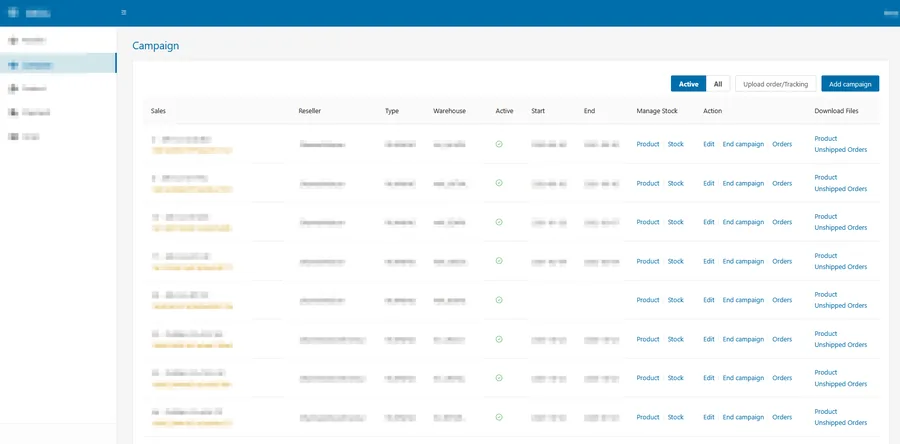
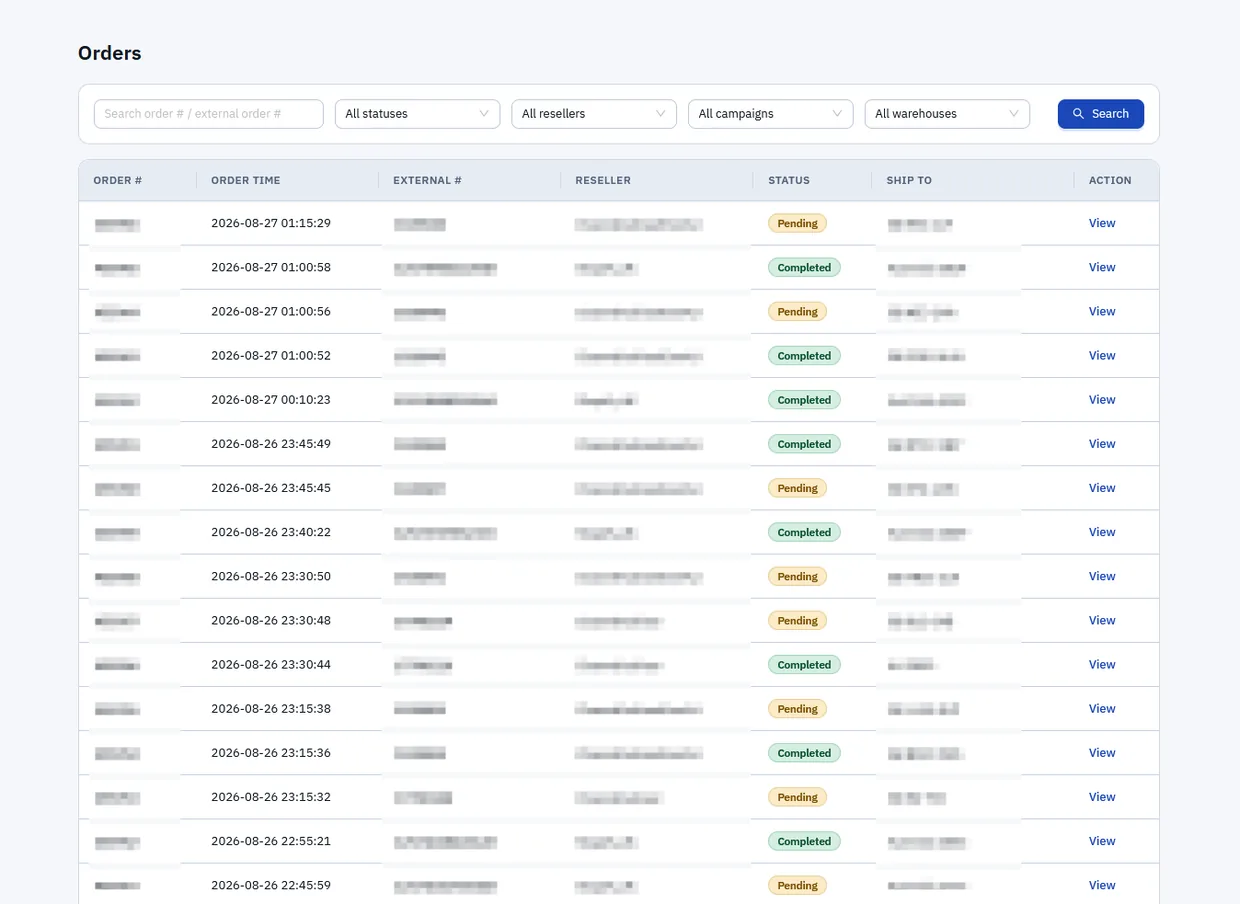
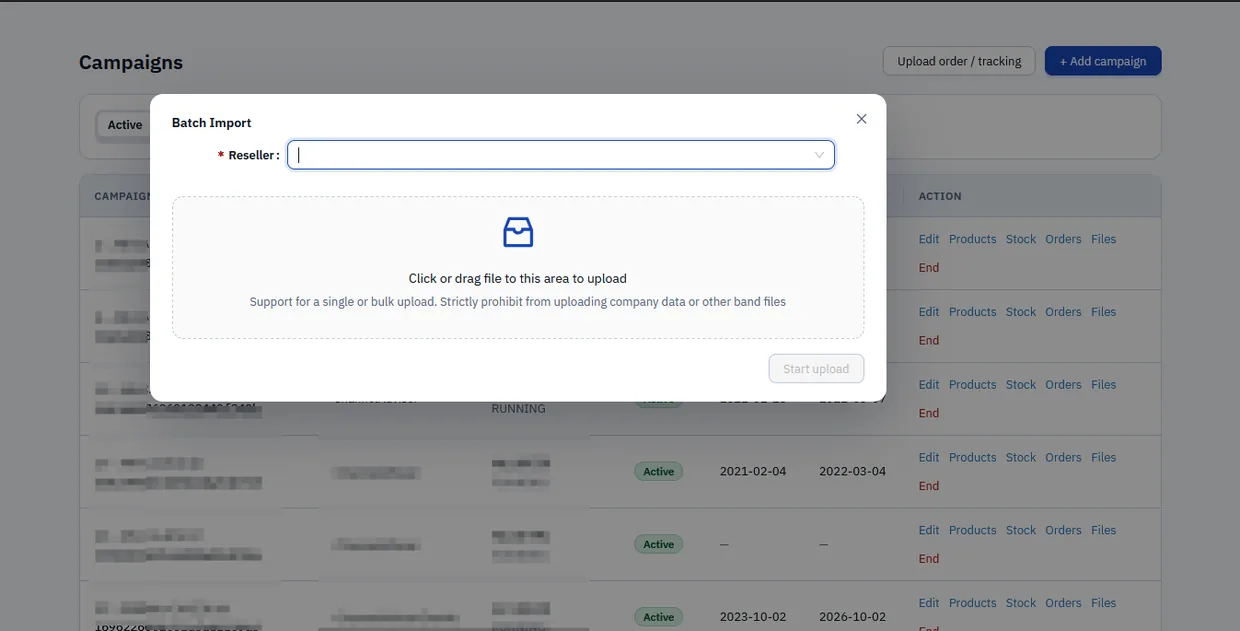
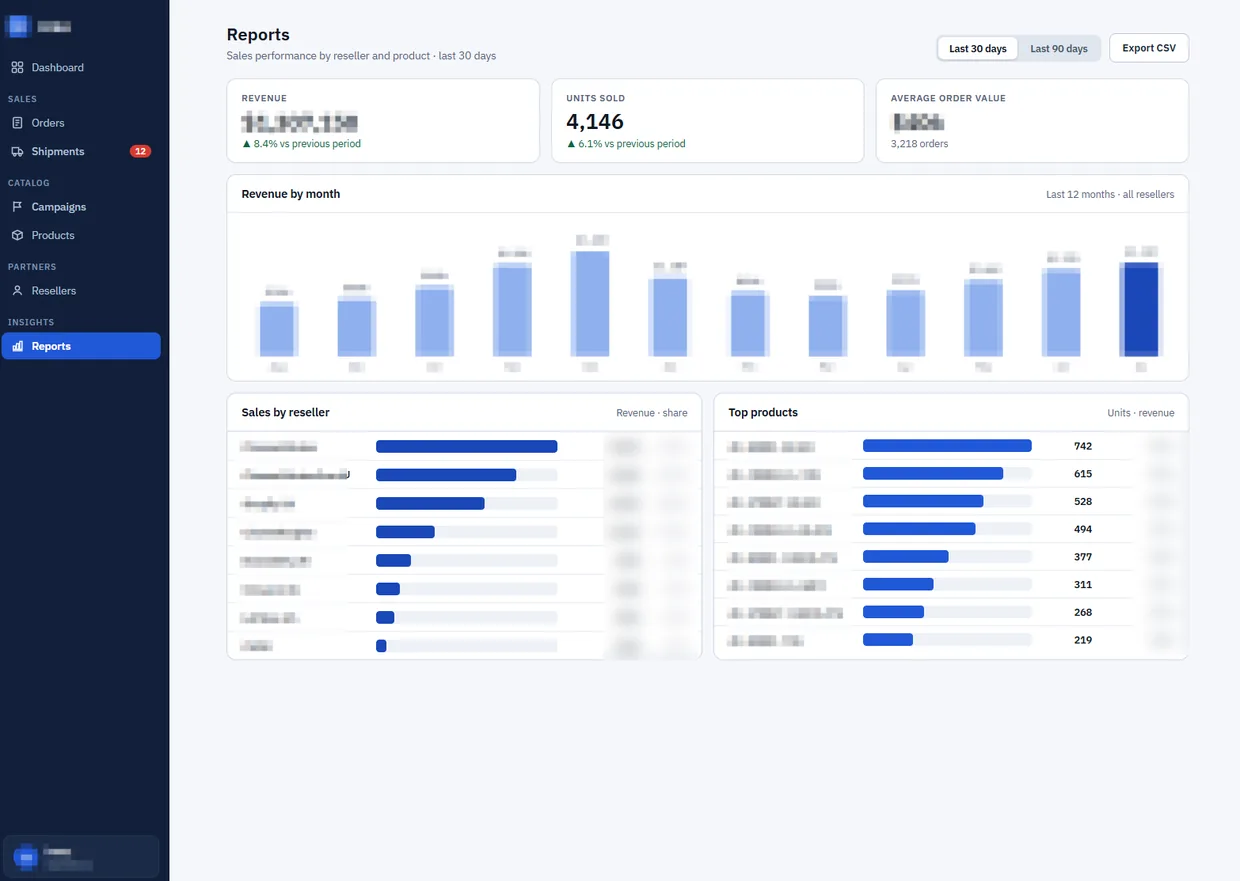
These are screens from the system running in production, not mock-ups. Client names, addresses, order numbers and revenue figures are obscured; everything else is the software as the team uses it.

The order hub dashboard tPanel built, showing orders today, pending orders awaiting fulfilment, last sync time, latest orders with pending, completed and partially shipped statuses, and navigation for campaigns, products and resellers
The dashboard. Today's orders, what is still awaiting fulfilment, when each channel last synced, and the items waiting on a person — with campaigns, products and resellers a click away.
The order list in the order hub, showing orders from every channel with order time, the channel's own external order number, the reseller, a pending or completed status and the ship-to address, filterable by status, reseller, campaign and warehouse
Every channel's orders, one list. Filterable by status, reseller, campaign and warehouse — the warehouse filter is the routing rules made visible. The external number column keeps each order's original identity on the channel it came from.
The campaigns screen in the order hub with a batch import dialogue open, showing a reseller selector and a drag-and-drop upload area, and each campaign carrying its own products, stock, orders and files
Campaigns, and the fallback path. Each campaign carries its own products, stock, orders and files. The batch import dialogue is the manual route: a reseller's orders or tracking numbers can be pushed in by file when a provider's API is having a bad day.
The reports screen in the order hub, showing units sold and order count for the period, revenue by month across twelve months, sales by reseller with share of revenue, and top products by units
Performance by reseller and by product. In the same system as the orders, which is the whole point — this screen is what replaced the month-end spreadsheet merge.

This is the point where an integration becomes an internal business system. The connective work is what makes the data trustworthy; the interface on top is what makes it useful to the people doing the work every day.

04

What Changed

  • Around 80% of the repetitive manual work is gone — the client's own estimate, and the number they lead with.
  • No more downloading and reformatting. Orders from every channel arrive in one system, already in one format.
  • Tracking numbers stop being a job. They flow back from the warehouse and out to the channel automatically, so customers see dispatch when it happens rather than when someone gets to it.
  • Growth stopped adding headcount. Order volume can rise without the operations workload rising with it, because the per-order handling cost is close to zero.
  • New channels and warehouses are a connector, not a process. Onboarding one means writing an adapter to the canonical order — not inventing another manual routine.

The last point is the one with the longest tail. Before the hub, every new channel or fulfilment partner carried a hidden operational tax, which meant commercial decisions were being made partly on the basis of who wanted to do the extra typing. Afterwards, the business could take a channel because the channel was worth taking.

That was 2020, and the first version took about eight weeks to build and go live. Six years later the hub is still the system the online side of the business runs on: eight sales channels connected, four third-party warehouse providers, around 150 orders a day moving through it. tPanel is still extending it — most recently in August 2026, when it was upgraded to Laravel 13 on PHP 8.4. That last part is the unglamorous half of the job, and it is the half that decides whether a custom system is an asset in year six or the legacy system somebody has to replace in a hurry.

This custom order hub cut our repetitive manual work by around 80%, so we can spend more time on the product itself. tPanel has also been very responsive — every issue we had was resolved very quickly.

— Louis W. · E-Commerce Director, Everau
05

When an Order Hub Is Worth Building

tPanel does not recommend building one by default. Plenty of retailers are well served by an off-the-shelf order management system, or by their store platform plus a connector app, and where that is true it is the cheaper and better answer. The honest test is whether the standard product fits the business or the business is being reshaped to fit the product.

A custom hub earns its cost when several of these are true at once:

  • Channels the connectors do not cover. A marketplace, a wholesale portal or a reseller arrangement that no vendor has built an integration for.
  • Routing that is genuinely yours. Which warehouse ships what, under which conditions, is a real business rule rather than a single default.
  • Warehouse providers, not your own warehouse. Third-party fulfilment means integrating with someone else's API on their terms — several times over.
  • Order shapes that are not plain retail. Reseller orders, campaign orders, bulk orders and partial shipments break tools that assume one customer buying one basket.
  • The workaround has a headcount. When you can name the hours per day spent moving data between systems, the build has a payback period you can calculate.

If most of that sounds familiar, the automation guide walks through how to size the saving before committing to a build, and the custom software cost guide covers what projects in this class typically run to. Where the storefront itself is the constraint rather than the operations behind it, Shopify development is often the better place to start.

FAQ

Questions about order hubs and channel integration

Selling through more channels than your systems can keep up with? Tell us which channels and which warehouses, and we’ll tell you what the integration has to do.

What is a multi-channel order hub?

An order hub is a system that sits between the places orders arrive and the places orders are shipped from. It collects orders from every sales channel through their APIs, converts them into one canonical order format, applies the business's own routing rules to decide which warehouse fulfils each one, sends the order on, and then syncs the tracking number back to the channel the order came from.

The point is the format in the middle. Once every channel's order looks the same internally, fulfilment, reporting and exception handling only have to be built once instead of once per channel.

Why not use an off-the-shelf order management system?

For a standard retail setup, an off-the-shelf order management system is usually the right answer, and tPanel will say so.

It stops fitting when the business has channels the product does not support, resellers and campaigns that do not look like ordinary retail orders, or warehouse providers whose APIs are not on the vendor's connector list. At that point every gap becomes a spreadsheet, and the software people are paying for is the software they are working around. A custom hub is worth building when the routing rules and the channel mix are the business, rather than a variation on someone else's default.

How do you connect a third-party warehouse or 3PL that has its own API?

Each warehouse gets its own adapter: a small piece of software that knows how to speak that provider's API, and nothing else. The adapter receives the canonical order, translates it into the provider's expected fields, sends it, and translates the dispatch confirmation and tracking number back.

Because every adapter reads and writes the same canonical order, adding a warehouse provider is a contained piece of work rather than a change that ripples through the whole system.

What happens when a channel or warehouse API fails?

Failure handling is most of the engineering in an integration project. Transient failures are retried automatically with backoff. What cannot be resolved that way lands in a review queue on the dashboard, and in practice it is one of three things: an order that failed to push to a warehouse, a stock level that failed to sync, or an order that failed to come back from a channel. Each is a named record with a specific problem, waiting for someone to correct the information — not a generic error nobody can act on.

Above that sits alerting. If a scheduled job keeps failing for more than a few hours, the system messages the tPanel team directly rather than waiting for the client to notice, and in practice these are diagnosed and fixed within hours. A manual upload path also stays available so staff can push an order or a tracking number through by hand while a provider is having a bad day. The rule is that an order is never lost, and someone is always told.

Can an order hub handle partial shipments and split orders?

Yes, and it has to. Real orders split: one line ships today from one warehouse, another line ships next week from another, and the channel still expects consistent status updates.

The hub tracks fulfilment at both levels. Each line carries its own status, and the order carries a partially shipped state of its own — a first-class status rather than an exception — until everything on it has been dispatched, at which point the order is closed on the originating channel.

How much does a custom order hub cost in Australia?

A multi-system integration that connects several platforms, applies business rules, handles exceptions and needs monitoring typically falls between A$12,000 and A$45,000 as a one-off build in Australia. The range is driven by how many channels and warehouse providers are involved, how good their APIs are, and how failures must be handled.

A hub with its own dashboard, plus reseller and campaign management, sits at the upper end or above, because it is a business system as well as an integration. The custom software cost guide breaks the numbers down by project type.

Orders arriving faster than your team can re-type them?

Tell us which channels you sell through and who ships your orders. We will tell you what a hub between them would have to do, and what it would take to build.