Discovery
We work with your team to map each step, identify who is responsible and locate the data it uses. This includes repeated data entry, shared spreadsheets and points where work is delayed.

Exactly how a business problem becomes working software - the phases, the honest timelines, and what makes a project go well.
By Tim Wang - Development Manager, tPanel - LinkedIn -> - Updated 16 October 2026
The custom software development process is the path from a business problem to working software, and it runs through seven phases: discovery, scoping and roadmap, design, development and integration, testing, launch and training, then iteration. Each phase answers a different question - first what the problem really is, then what to build, then how it should work, then the build itself, then whether it holds up, and finally how it improves over time.
This guide explains what happens in each phase, who needs to be involved, how to plan the timeline and what can cause delays. It draws on tPanel's custom business software projects for Australian businesses.

Custom software is built in distinct phases, each with a clear purpose. Naming them up front makes the rest of the project legible - you always know where you are and what comes next. The standard sequence looks like this:
The first three phases are mostly about decisions; the last four are about building, proving and improving. Skipping or rushing the early phases is the single most common reason projects overrun, because every wrong assumption gets baked into code that then has to be unpicked.
The phases are not a one-way waterfall. tPanel delivers iteratively, in short cycles, getting working software in front of your team early rather than disappearing for months against a giant upfront specification. It is worth knowing the three common delivery styles so the rest of this guide makes sense:
The MVP-first approach later in this guide is the hybrid style in action - agree the shape, build the core first, then grow it on evidence.
Here is what actually happens inside each phase of a custom build, from the first conversation to ongoing support.
We work with your team to map each step, identify who is responsible and locate the data it uses. This includes repeated data entry, shared spreadsheets and points where work is delayed.
We agree on the first workflow to deliver, the roles and permissions it needs, and any required integrations. Other features are placed on a roadmap for later releases.
We design the screens, record statuses, fields and reports. The data model describes how information is related: for example, a job belongs to a customer and contains several tasks.
We build the workflow and connect the existing accounting, email, payment, scheduling or industry tools it needs. These system integrations reduce the need to copy data between applications.
We test the usual workflow as well as missing data, invalid inputs and permission boundaries. Your team helps test scenarios from daily work so issues can be addressed before rollout.

We prepare the live system, migrate the agreed data and train the people who will use it. A staged rollout gives the team time to practise and resolve issues before wider use.

The first weeks focus on issues found during daily use. Further features, reports and integrations are then planned around the team's priorities. Ongoing maintenance includes monitoring, backups, security and dependency updates, and support.
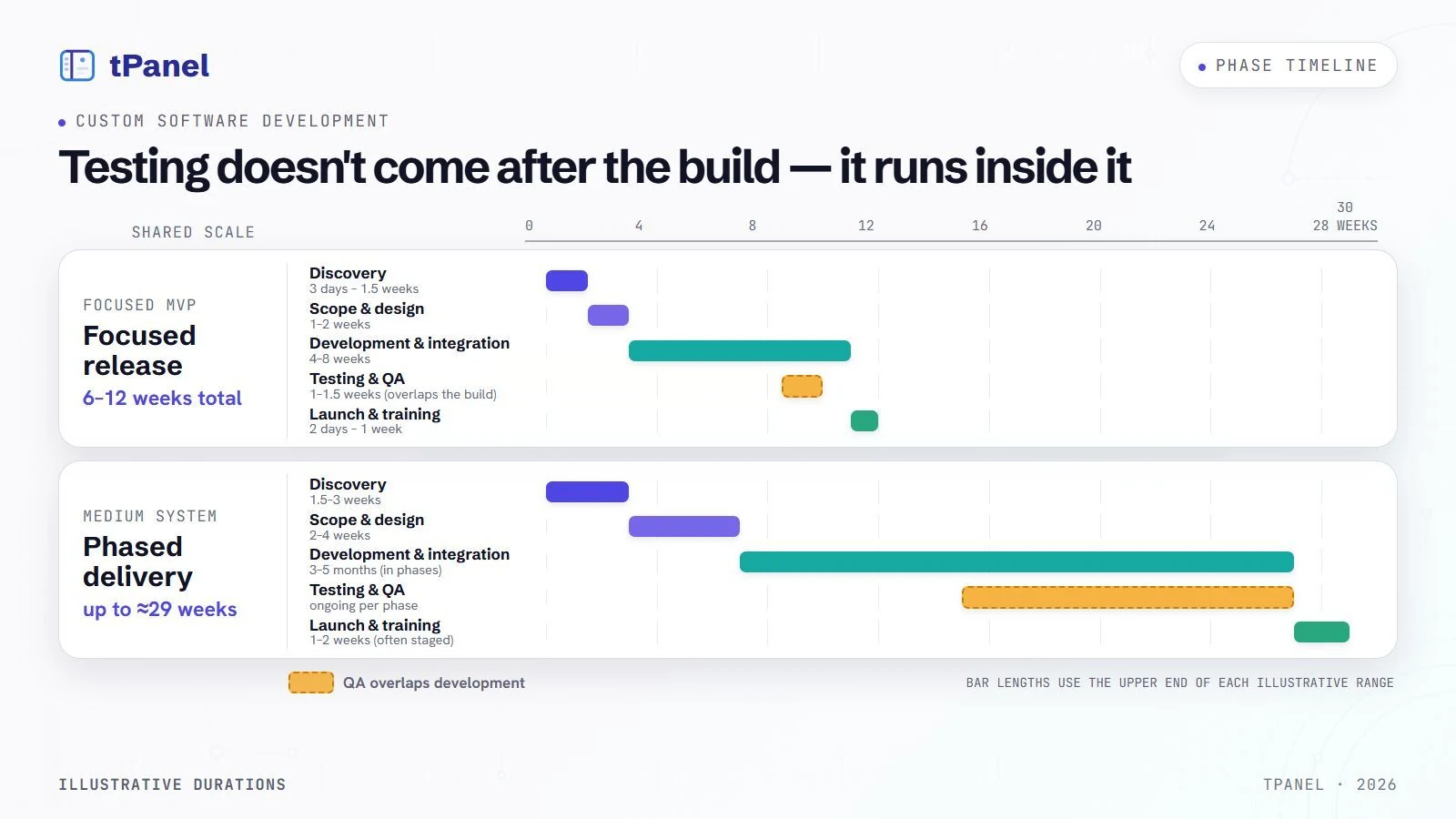
Timelines vary with scope, but honest ranges help you plan. A focused MVP - one workflow done well - typically runs around 6 to 12 weeks end to end. A medium system - say two to four connected workflows with three or four integrations - usually runs around four to seven months, delivered in phases rather than all at once. The build itself is always the longest stretch; discovery and design are shorter but disproportionately important.
The table below is illustrative - every project is different - but it shows how the same phases stretch as scope grows. The MVP column matches a small single-workflow build; the medium column matches a mid-size custom system (custom CRM, internal or operations system) in the A$12,000-45,000 range described in our cost guide.
| Phase | Focused MVP (illustrative) | Medium system (illustrative) |
|---|---|---|
| Discovery | 3 days - 1.5 weeks | 1.5 - 3 weeks |
| Scope & design | 1 - 2 weeks | 2 - 4 weeks |
| Development & integration | 4 - 8 weeks | 3 - 5 months (in phases) |
| Testing & QA | 1 - 1.5 weeks (overlaps the build) | ongoing per phase (overlaps the build) |
| Launch & training | 2 days - 1 week | 1 - 2 weeks (often staged) |
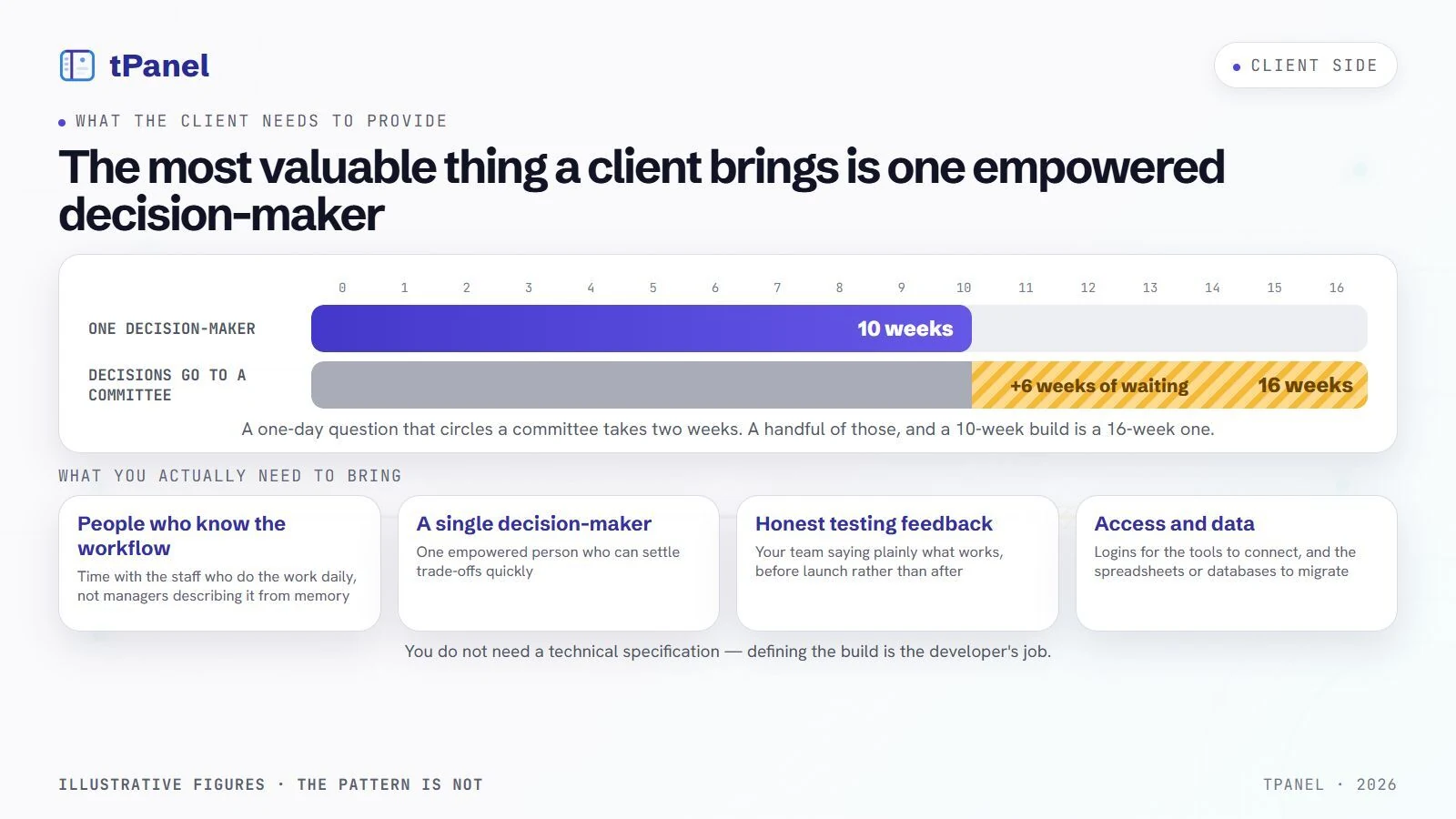
What stretches a timeline is usually scope, slow decisions on the client side, and complex integrations with older systems. For how those same factors move the budget, see our guide on custom software cost in Australia.
An MVP is a first usable version that supports a complete workflow. Delivering it early lets the team try the system in daily work and decide what needs changing or adding. This helps limit the initial scope and uncover incorrect assumptions sooner.
This is also why a custom build often beats configuring a packaged product around your edge cases. If you are still weighing that decision, our guide on custom software vs off-the-shelf compares the two honestly.
Choose a small user group or one complete workflow for the first release. A useful phase must let people finish real work, including its exceptions and handovers. Agree who can approve each release and the checks that must pass before more users move across.
A custom build is a partnership, and a few things from your side make the difference between a smooth project and a stalled one. You do not need a technical specification or any software knowledge - defining the build is the developer's job. What you do need to bring is access, decisions and feedback.
Unclear scope, delayed decisions, incomplete requirements and poor launch preparation can all slow a project. Agree how these issues will be handled before development begins.
tPanel runs every custom software development project through these phases, kept deliberately lightweight so you spend time on decisions, not paperwork. We start with discovery to understand your workflow, agree on an MVP and roadmap, design the data model and screens, then build and integrate in short cycles you can see progress on. Testing runs alongside the build, launch is staged with training, and we stay on for iteration and maintenance afterwards.
We build a range of systems this way - internal tools, lead and operations platforms, and custom CRM development tailored to how your team actually sells and serves. Whatever the system, the process is the same: understand the work first, build the smallest version that delivers, then grow it on evidence. If you have a workflow that needs fixing, the best next step is a short discovery conversation - tell us what is slowing your team down and we will map out how it would work.
The Particle CRM and mobile app case study shows the delivered workflows, tenant architecture and ongoing development behind a real system. It is evidence of the application and our work, not a claim that every project needs the same architecture or timeline.
Translate a workflow into an acceptance record before building it. For lead allocation, specify the eligible consultant, the visible customer history, what happens when ownership changes and which roles may access the record. Agree the test data, expected result and person who signs it off. Use that same record during demonstrations, testing and launch checks so approval refers to an observable result.
Can't see your question here? Tell us what you're trying to build and we'll answer it directly - no sales script.
There are seven stages: discovery (understanding the workflow and where data moves), scope and roadmap (defining the MVP, phases, roles and integrations), UX and data model design (screens, statuses, fields and dashboards), development and integration (building the software and connecting existing tools), testing and QA, launch and training, and iteration and maintenance. The early stages are about decisions; the later stages are about building and refining.
A focused MVP that solves one workflow well typically takes around 6 to 12 weeks from kick-off to launch. Larger builds that span several teams, replace multiple tools or require deep integrations usually run three to six months or more, delivered in phases. Discovery and design take one to three weeks, the build is the longest stretch, and testing plus launch usually add one to two weeks.
An MVP, or minimum viable product, is the smallest version of the system that delivers real value in daily use - the core workflow rather than every feature anyone has ever asked for. Starting with an MVP gets working software in front of your team sooner, lets you learn from real usage before spending more, and avoids building features nobody ends up using. After launch the system grows in phases based on what people actually need.
You provide access to the people who genuinely know the workflow, timely decisions when trade-offs come up, and honest feedback during testing. You also supply access to the systems you want connected and any data that needs to be migrated. You do not need a technical specification - that is the developer's job. A single, empowered decision-maker on your side is the most valuable thing you can offer.
After launch the work shifts to iteration and maintenance. The first few weeks focus on fixing rough edges and adjusting things real usage reveals. From there the system grows in planned phases - new features, more integrations and reports - based on what your team needs next. Maintenance covers updates, monitoring, backups and support so the software stays reliable as your business changes.
Tell us what is slowing your team down. We will map the phases, give you an honest timeline, and show you what an MVP would look like.